Alerts and Notifications
VolatiCloud's alerting system pushes the events you care about to email and the in-app notification drawer — bot errors, trade closes, drawdown breaches, connection issues, billing events, and more. Critical alerts go out immediately; routine events batch into digests so your inbox doesn't fill up. The intelligent alerts blog post covers the design philosophy and best practices; this page is the reference for what's available out of the box.
How Crypto Trading Alerts Work
Every trading or billing event is checked against your active alert rules. Matching rules either deliver immediately (Critical) or batch into digests (Warning, Info), with cooldowns suppressing repeat firings of the same rule within a configurable window.
Available Alert Types
| Alert Type | Trigger |
|---|---|
| Bot Status Change | Bot transitions to a specific status (error, stopped, unhealthy, etc.) |
| Trade Opened | A new trade opens on a bot |
| Trade Closed | Any trade closes on a bot |
| Large Profit / Loss | A trade closes with profit or loss above a configured threshold |
| Profit Target | A trade hits a configured profit target |
| Drawdown Threshold | Bot's max drawdown exceeds X% |
| Daily Loss Limit | Bot's daily loss exceeds X% |
| Backtest Completed | A backtest finishes successfully |
| Backtest Failed | A backtest encounters an error |
| Backup Failed | A bot database backup fails |
| Connection Issue | Bot loses connectivity to the exchange |
| Low Credit Balance | Organization credit balance drops below threshold |
| Payment Failed | A billing payment attempt fails |
| Payment Succeeded | A subscription payment is processed successfully |
| Subscription Cancelled | Organization subscription is cancelled |
| Organization Suspended | Organization is suspended due to billing issues |
| Organization Reactivated | Suspended organization is restored after payment |
| Plan Changed | Subscription plan is upgraded or downgraded |
| Trial Started | Free trial begins for the organization |
| Trial Ending Soon | Free trial expires in 3 days |
| Trial Converted | Trial converts to a paid subscription |
| Trial Expired | Trial expires without converting to paid |
Severity Levels
| Severity | Use Case |
|---|---|
| Critical | Bot errors, system failures, suspended organizations |
| Warning | Significant events needing attention (drawdown, payment failures) |
| Info | General notifications, trade updates, plan changes |
Severity indicates the importance of an alert. Delivery mode (immediate vs batched) is configured per rule, not derived from severity — so a Warning rule can be set to immediate delivery, and an Info rule can be batched.
Default Alert Rules
Every organization is seeded with pre-configured system alert rules at creation time. You can edit delivery settings (recipients, enabled/disabled flag, cooldown) but not their core detection logic.
| Rule | Severity | Delivery |
|---|---|---|
| Bot Status Change | Info | Immediate |
| Connection Issue Alert | Critical | Immediate |
| Backtest Completed Alert | Info | Immediate |
| Backtest Failed Alert | Warning | Immediate |
| Backup Failed Alert | Warning | Immediate |
| Trade Opened | Info | Batched |
| Trade Closed | Info | Batched |
| Organization Suspended | Critical | Immediate |
| Low Credit Balance | Warning | Immediate (24h cooldown) |
| Payment Failed | Warning | Immediate |
| Payment Succeeded | Info | Immediate |
| Subscription Cancelled | Warning | Immediate |
| Trial Started | Info | Immediate |
| Trial Ending Soon | Warning | Immediate |
| Trial Converted to Paid | Info | Immediate |
| Trial Expired | Warning | Immediate |
| Plan Changed | Info | Immediate |
| Organization Reactivated | Info | Immediate |
In-App Notifications
Beyond email, VolatiCloud surfaces alerts inside the app:
- Notification drawer — click the bell icon in the top navigation
- Toast notifications — pop-up alerts for Critical and Warning events while you're in the app
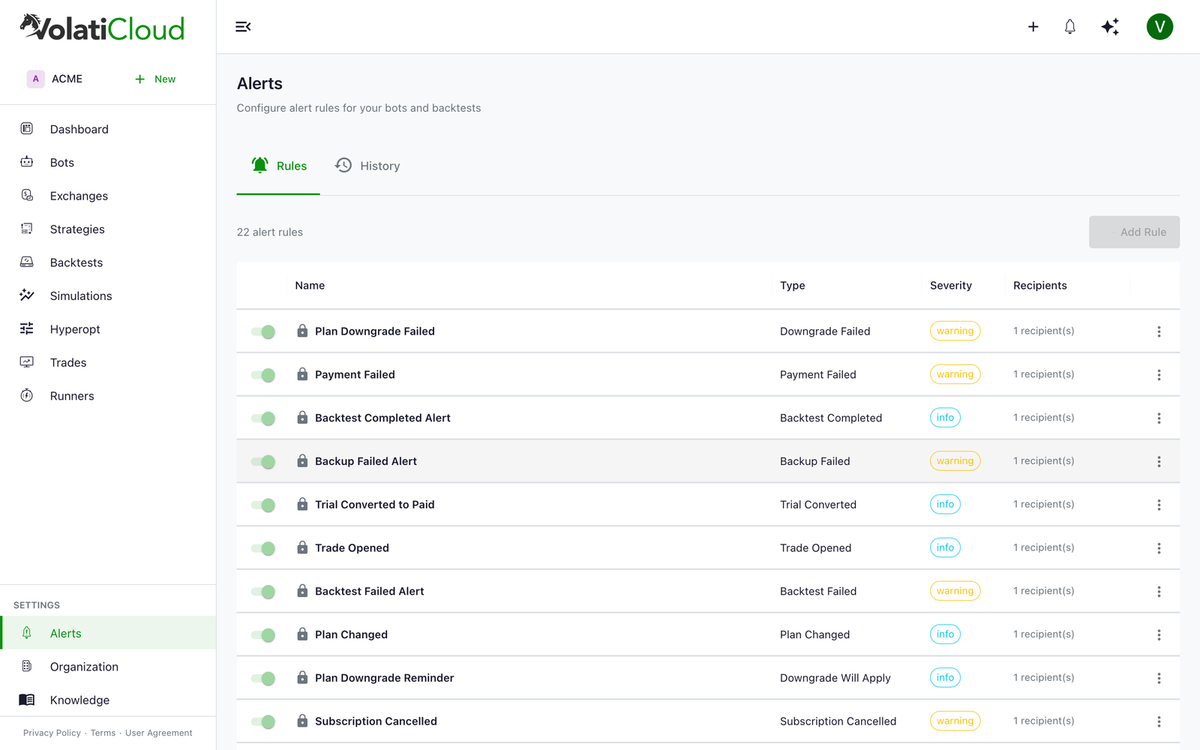
- Alert event history — full audit trail on the Alerts page (sent, suppressed, failed, recorded, pending)
Alerts Page
Navigate to Alerts to see:
- Rules tab — all configured alert rules, with toggles to enable/disable and links to edit
- History tab — every triggered alert with delivery status
Bot-Level Alerts
Each bot has its own Alerts tab showing:
- Alert rules scoped specifically to this bot (in addition to org-level rules)
- Alert event history filtered to this bot
Next Steps
- Alert Rules — create and configure custom alert rules
Learn More
- Crypto Trading Bot Alerts: Severity-Based Email Without the Noise — how severity-based digests and cooldowns keep you informed without alert fatigue.
- Real-Time Bot Monitoring — the pull-based half of monitoring, complementing alert email.