Billing Overview
VolatiCloud uses a subscription + credits billing model: your monthly plan unlocks features (Code Mode, hyperopt, simulations, team management), sets your resource caps (how many bots, strategies, runners and exchange accounts you may create), and deposits a fixed amount of credits into your balance. Bots and backtests then draw down credits as they run. This page explains how the two layers fit together, what triggers suspension, and where to manage everything from the dashboard.
If you're brand new, the 7-day free Pro trial is the fastest way to see this in action — full Pro features with $60 of trial credits, no charge until conversion.
Two-Layer Billing Model
Billing has two independent layers that you should keep mentally separate:
| Layer | What it controls | When it changes |
|---|---|---|
| Subscription | Feature gates (Code Mode, hyperopt, Monte Carlo, reinforcement learning, AI chat, team management) and resource caps (bots, strategies, runners, exchange accounts, alert rules) | At plan change, cancellation, or trial conversion |
| Credits | Compute usage: bot runtime, backtest runtime, hyperopt epochs — and the AI assistant's token usage | Hourly for running jobs; per turn for the assistant |
One way to think about it: the plan is your gym membership; credits are your energy bars. Every workout burns energy bars, and the membership decides which equipment you may use. Free is a membership too — it covers backtesting, not bots.
Plan Comparison at a Glance
| Feature | Free | Starter | Pro | Enterprise |
|---|---|---|---|---|
| Monthly price | $0 | $3.99 | $29.99 | $79.99 |
| Yearly price | — | $41.88/yr ($3.49/mo) | $299.88/yr ($24.99/mo) | $779.88/yr ($64.99/mo) |
| Monthly credit deposit | None — one-time grant at signup | $5 | $60 | $200 |
| Max bots | 0 | 2 | 10 | 50 |
| Max strategies | 2 | 5 | 25 | 100 |
| Max connected exchange accounts | 0 | 1 | 5 | 20 |
| Max bot runners | 0 | 0 | 1 | 10 |
| Max concurrent backtests | 1 | 1 | 3 | 10 |
| Max alert rules | 0 | 3 | 20 | 100 |
| Max share links | 10 | 50 | 200 | 1,000 |
| Live trading | No | Yes | Yes | Yes |
| Code Mode (Python) | No | No | Yes | Yes |
| Hyperopt + Simulations | No | No | Yes | Yes |
| Team management | No | No | No | Yes |
Every number in that table is a hard cap the platform enforces on create — no plan is uncapped. Free is the plan every new organization starts on: it can build and backtest strategies, but its bot, exchange and runner caps are all zero, so it cannot trade. For the full feature matrix and yearly billing, see Plans & Pricing.
How Credits Work
Credits are denominated in US dollars: 1 credit = $1. Once they're in your balance, they're spent the same way regardless of how they got there.
How credits are deducted
Credits are deducted hourly based on what each bot, backtest, or hyperopt run is consuming — CPU time, memory, network egress, and storage. A bot that's stopped consumes nothing; a bot that's running consumes proportionally to its workload.
How credits are added
| Source | When it arrives | Persistence |
|---|---|---|
| Subscription auto-deposit | At each billing renewal | Reset at next renewal — does not roll over |
| Manual top-up (Add Credits) | Immediately on Stripe success | Carries over indefinitely until consumed |
| Trial deposit (Pro trial) | At trial start | Cleared at trial end or conversion |
The non-rollover policy on subscription credits means each month is a clean slate: at renewal we clear any leftover subscription credits, then deposit the new month's allowance. Manual top-ups are independent and never cleared. See Credits — The No-Rollover Rule for the exact ledger entries this generates.
What Suspension Looks Like
Your organization is suspended when its credit balance reaches $0. That happens in two ways:
- Credits run out — bots are stopped, but your plan and its features stay in force. Top up credits to resume.
- A subscription or trial ends and leaves no credits — the workspace moves to the Free plan, unused trial or subscription credits are removed, and if that leaves $0 the organization is suspended too. Add credits to resume backtesting, or subscribe to get a paid plan back.
A subscription ending does not suspend an organization that still has credits. It moves to Free with that balance: bots are stopped, because Free includes no bots, and backtests keep running within Free's limits. See Plans & Pricing — Cancellation for everything that changes.
While suspended, you can still:
- Sign in to the dashboard
- View bots, strategies, backtests, and historical data
- Add manual credits
- Subscribe or change plans
You cannot start bots, run backtests, or run hyperopt until the org is unsuspended. No data is deleted on suspension — your strategies, backtests, trade history, and configurations are preserved indefinitely.
A low-balance alert fires automatically when your balance drops below $5.00 so you have time to top up before suspension.
Plan Changes — Upgrades vs Downgrades
Plan changes happen on different schedules so neither direction surprises you:
| Direction | When it takes effect | Billing | What you keep |
|---|---|---|---|
| Upgrade | Immediately | Prorated for the remainder of the period | New plan's features and credit deposit right away |
| Downgrade | At the end of the current billing period | New plan rate at next renewal | Current plan's features until renewal |
Upgrades unlock features (Code Mode, hyperopt, etc.), raise your caps, and land a higher credit deposit immediately, so they're useful when you need to scale up mid-month. Downgrades are deferred so you don't lose paid features mid-period — you may need to reduce active bots before the new lower caps take effect at renewal. See Plans & Pricing — Changing Plans for the step-by-step process.
You can also cancel a pending downgrade any time before it takes effect by re-selecting your current plan on the Available Plans grid.
The Billing Page
Manage everything from Organization → Billing. The page is divided into three sections that mirror the layers above.
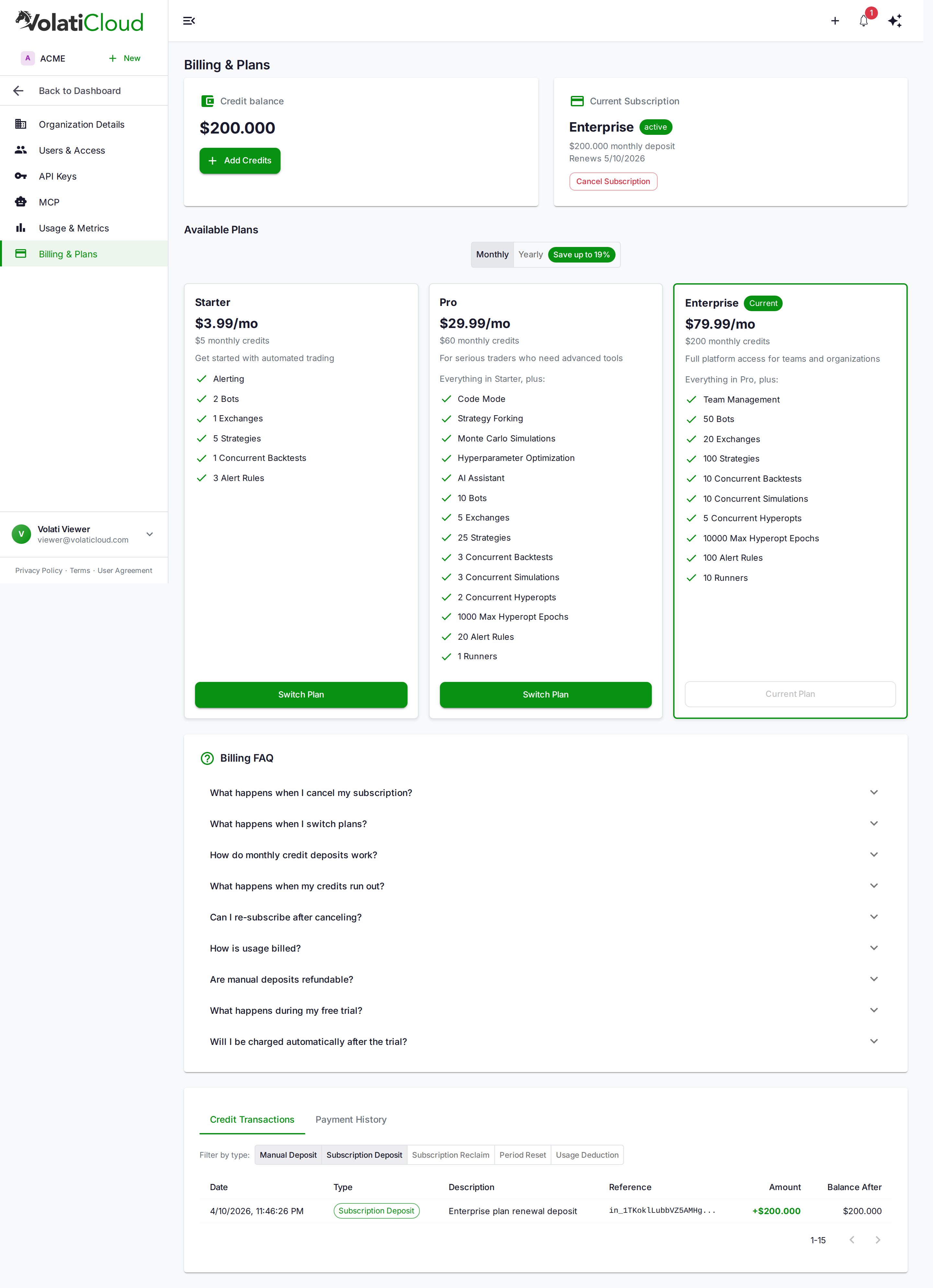
| Section | What you do here |
|---|---|
| Credit balance + Add Credits | View remaining credits, top up via Stripe Checkout |
| Current subscription | See active plan, renewal date, payment method; cancel or open Stripe portal |
| Available plans | Upgrade, downgrade, switch monthly/yearly, start trial |
| Transaction history | Every deposit, deduction, reclaim, and reset on the ledger |
| Invoices | Download PDF invoices for past Stripe charges |
Free Trial
New users can try the Pro plan free for 7 days. You'll receive $60 in trial credits when the trial starts and full Pro feature access. A payment method is collected at checkout — but nothing is charged during the seven days. On day 7 the trial converts to a paid Pro subscription and your card is charged, unless you cancel first. Cancel any time during the 7 days at zero cost — the workspace moves to the Free plan, remaining trial credits are removed, and your data is preserved.
See Plans & Pricing — Free Trial and Credits — Trial Credits for the full lifecycle.
What Operations Need What
For a quick reference, here's what each platform action requires:
| Operation | Plan | Credit balance > 0 |
|---|---|---|
| Sign in, view dashboard | Any, including Free | No |
| Create a bot (configuration) | Starter or above — Free's bot cap is 0 | No |
| Start / restart a bot | Starter or above — Free includes no bots | Yes |
| Run a backtest | Any, including Free, within its limits | Yes |
| Run hyperopt | Pro or Enterprise | Yes |
| Add manual credits | Any | No |
| View invoices and history | Any | No |
An organization whose subscription has ended is on Free for every row of this table.
Frequently Asked Questions
The Billing FAQ answers the questions we hear most often:
- What happens to my credits when I cancel?
- What can I still do after my subscription ends?
- Do unused subscription credits roll over?
- What does
subscription_resetmean in my transaction history? - How does payment retry work after a failed charge?
Next Steps
- Plans & Pricing — Full feature matrix, yearly discounts, trial details.
- Credits — Consumption rates, transaction types, top-up flow.
- Billing FAQ — Edge cases and ledger semantics.