VolatiCloud Plans & Pricing
VolatiCloud has a Free plan and three paid subscription tiers — Starter for running your first live strategy, Pro for solo traders running real strategies, and Enterprise for teams and high-volume operations. Each plan unlocks different platform features, sets different resource caps, and deposits a different monthly credit allowance, so pick the tier that matches your feature needs, the number of bots and strategies you expect to run, and your compute usage.
Free is where every new organization starts, and it exists to answer one question before you pay anything: does this strategy actually work? You can build strategies in the visual builder and backtest them. You cannot trade on Free — it has no bots, no exchange connections and no runners — so the moment you want a strategy to place an order, Starter is the step up.
This page is the canonical comparison: pricing, limits, included credits, yearly discounts, and the 7-day free Pro trial. For the underlying billing model, see the Billing Overview.
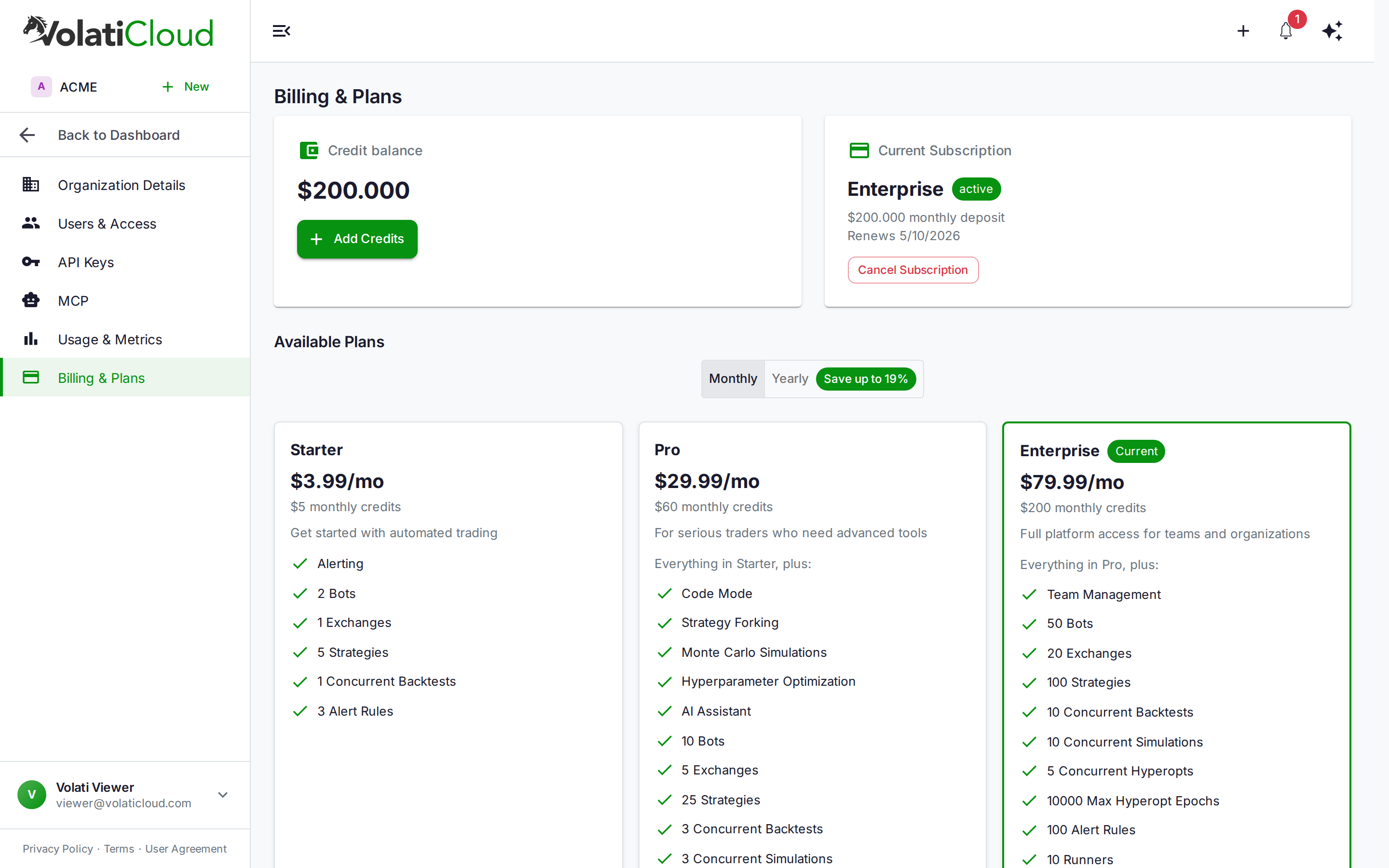
Plan Comparison
Every number below is a hard cap the platform enforces, not a guideline. When you reach one, the next create is refused with a quota error until you delete something or move up a plan. Bots, strategies, runners, exchange accounts and alert rules are capped on every plan, Enterprise included — none of them is unlimited on any tier.
| Feature | Free | Starter | Pro | Enterprise |
|---|---|---|---|---|
| Monthly price | $0 | $3.99 | $29.99 | $79.99 |
| Yearly price | — | $41.88/yr ($3.49/mo) | $299.88/yr ($24.99/mo) | $779.88/yr ($64.99/mo) |
| Yearly savings | — | $6.00/yr (~13%) | $60.00/yr (~17%) | $180.00/yr (~19%) |
| Monthly credit deposit | None — a one-time grant at signup | $5 | $60 | $200 |
| Free trial | — | — | 7 days | — |
| Bots | ||||
| Max bots | 0 | 2 | 10 | 50 |
| Dry Run (paper trading) | No | Yes | Yes | Yes |
| Live trading | No | Yes | Yes | Yes |
| Strategies | ||||
| Max strategies | 2 | 5 | 25 | 100 |
| Visual UI Builder | Yes | Yes | Yes | Yes |
| Code Mode (Python) | No | No | Yes | Yes |
| Fork a marketplace listing | No | Yes | Yes | Yes |
| Fork your own strategies | No | No | Yes | Yes |
| Reinforcement learning | No | No | Yes | Yes |
| Optimization & simulation | ||||
| Max concurrent backtests | 1 | 1 | 3 | 10 |
| Hyperparameter optimization | No | No | Yes | Yes |
| Max concurrent hyperopt runs | — | — | 2 | 5 |
| Max hyperopt epochs per run | — | — | 1,000 | 10,000 |
| Monte Carlo simulation | No | No | Yes | Yes |
| Max concurrent simulations | — | — | 3 | 10 |
| Infrastructure | ||||
| All exchanges supported | — | Yes | Yes | Yes |
| Max connected exchange accounts | 0 | 1 | 5 | 20 |
| Max bot runners (Docker or Kubernetes) | 0 | 0 | 1 | 10 |
| Dedicated infrastructure | No | No | No | By arrangement — contact us |
| Sharing & publishing | ||||
| Max share links | 10 | 50 | 200 | 1,000 |
| Publish a marketplace listing | No | Yes | Yes | Yes |
| Search-indexable public pages | No | Yes | Yes | Yes |
| Alerts | ||||
| Alerting | No | Yes | Yes | Yes |
| Max alert rules | 0 | 3 | 20 | 100 |
| Security | ||||
| Audit log export | Yes | Yes | Yes | Yes |
| Passphrase encryption | No | No | Yes | Yes |
| Passkey-backed end-to-end encryption | No | No | Yes | Yes |
| Organization | ||||
| Team management (invites, roles) | No | No | No | Yes |
| Team seats | 1 | 1 | 1 | No enforced cap |
| Role-based access control | No | No | No | Yes |
| Shared resources | No | No | No | Yes |
| AI | ||||
| AI chat assistant | No | No | Yes | Yes |
| Support | ||||
| Email support | — | Yes | Yes | Yes |
| Priority support | No | No | Yes | Yes |
| Dedicated support | No | No | No | Yes |
A bot runner can be Docker or Kubernetes on any plan — the runner type is not plan-gated. What the plan caps is how many runners you may create: 0 on Free, 0 on Starter, 1 on Pro, 10 on Enterprise.
Every bot must be bound to a runner, but that runner does not have to be one you own — a bot can also run on a runner another workspace has published as public. Starter, with a cap of 0, therefore depends on a public runner being available to it. Free never reaches this question: its bot cap is 0, so there is no bot to bind.
Which plan should I pick?
| Use case | Recommended plan |
|---|---|
| Testing whether a strategy idea backtests well, before paying anything | Free |
| Running your first live or paper-trading bot | Starter |
| Solo trader running real money, multiple strategies, hyperopt | Pro |
| Team or fund, multiple traders, custom infrastructure | Enterprise |
| Curious — want to test Pro features before committing | 7-day Pro trial |
Two jumps matter. Free → Starter is the one that turns research into trading: it is the first plan with bots, exchange connections and alerting, so it is where a strategy stops being a backtest and starts placing orders. Starter → Pro is the biggest feature jump, adding Code Mode, hyperopt, Monte Carlo, reinforcement learning, the AI chat assistant, passphrase and passkey encryption, and raising every cap — 2 bots to 10, 5 strategies to 25, 0 runners to 1. Live trading is available on every paid plan; it is not a Pro feature. Note that the AI chat assistant is a feature gate, not an allowance: the plan decides whether you may use it, and its token usage is then deducted from your credits like any other compute — see Credits.
Free Plan
Every new organization is on Free from the moment it is created, and an organization whose trial or paid plan ends moves back onto it. There is nothing to activate and no checkout to complete: Free is not a Stripe product, and an organization is on it precisely because it has no subscription in force.
Free exists to let you answer one question before you spend anything — does this strategy actually hold up? It is a research plan, not a trading plan.
What you can do on Free
- Build up to 2 strategies in the visual UI Builder
- Backtest them against real historical data, one run at a time
- Share a result with anyone via a share link (up to 10 live links)
- Export your audit log
What Free does not include
Free's caps are zero for everything that places an order or runs continuously:
- No bots, so no live trading and no Dry Run paper trading
- No exchange connections
- No bot runners
- No alert rules
- No hyperopt, no Monte Carlo simulation, no reinforcement learning, no Code Mode
- No forking — neither your own strategies nor a marketplace listing
- No marketplace publishing, and share links from a Free organization are never search-indexed
The last one is deliberate rather than incidental: reach is free, indexing is paid. You can show a backtest to anyone you send the link to; you cannot put a permanent page into the marketplace sitemap.
Credits and backtest allowance
Free receives a one-time credit grant when the organization is created. It is not a recurring deposit — no credits arrive each month the way they do on a paid plan, so once the grant is spent, the way to get more compute is to subscribe or to top up manually.
Backtests on Free are also bounded by a lifetime allowance and a daily cap in addition to the concurrency limit. Both are tuned at runtime rather than fixed in the plan, so the console is the authority on how many runs you have left — see Organization → Billing for your current position.
An organization whose trial ends, or whose cancelled plan reaches the end of its period, moves onto Free. One whose payment fails is on Free until a retry succeeds. It keeps its strategies and settings but gets Free's limits, not the plan it left, and it does not receive a second signup grant or a second free trial. See Cancellation for what stops and what keeps working.
Free Trial
New users can try the Pro plan free for 7 days before committing to a paid subscription. The trial gives you full Pro feature access and $60 of trial credits to spend on bots, backtests, and hyperopt.
How it works
- Sign up and navigate to Organization → Billing
- Pick the Pro plan and click Start Free Trial
- Complete Stripe Checkout — a credit card is required to start the trial, but nothing is charged for the seven days
- $60 of trial credits land in your balance immediately
- After 7 days the trial converts to a paid Pro subscription and your card is charged, unless you cancel before then
Cancel any time during the 7 days at zero cost. Nothing is charged before day 7; if you do not cancel, the trial converts on day 7 and your card is charged. See Billing FAQ — Trial for the conversion mechanics.
Trial details at a glance
| Duration | 7 days |
| Plan | Pro (full feature access, and Pro's caps) |
| Credits | $60 deposited at trial start |
| Eligibility | Once per user and once per organization, and only for an organization that has never held a subscription. A new Free organization qualifies, so Free is the normal place to start a trial from; an organization that moved to Free after a trial or paid plan ended does not. Free, Starter and Enterprise have no trial of their own |
| Payment method | Required to start: a card is collected at Stripe Checkout, and nothing is charged before day 7 |
| Charge | None during trial; first charge at conversion |
| Cancellation | Any time before the 7 days end |
What happens at conversion
When the 7 days end, you have not cancelled, and a payment method is on file:
- The subscription converts to a paid Pro plan (monthly billing by default; yearly if you selected yearly during sign-up)
- Trial credits are cleared and a fresh $60 monthly subscription deposit is applied
- Your first Stripe invoice is generated
If you cancel during the trial or the trial expires without a valid payment method, no charge is made and the workspace moves to the Free plan: running bots are stopped, because Free includes no bots, and unused trial credits are removed. Backtests still run on Free, within its limits, while you have credits left; if none remain, they are paused until you add credits or subscribe. See Credits — Trial Credits for the ledger entries.
Yearly Billing
Pay annually to save between 13% and 19%, depending on the plan. The yearly price is billed once as a single annual charge:
| Plan | Monthly | 12 months at the monthly rate | Yearly price | Equivalent per month | Annual savings |
|---|---|---|---|---|---|
| Starter | $3.99 | $47.88 | $41.88 | $3.49 | $6.00 (~13%) |
| Pro | $29.99 | $359.88 | $299.88 | $24.99 | $60.00 (~17%) |
| Enterprise | $79.99 | $959.88 | $779.88 | $64.99 | $180.00 (~19%) |
Free has no yearly option — there is nothing to bill.
Toggle between monthly and yearly on the Available Plans grid. The same per-plan credit deposit applies each month, just billed less often.
Changing Plans
Plan changes happen on different schedules — upgrades take effect immediately, downgrades wait until the period ends — so you never lose paid features mid-month and you don't pay for features twice.
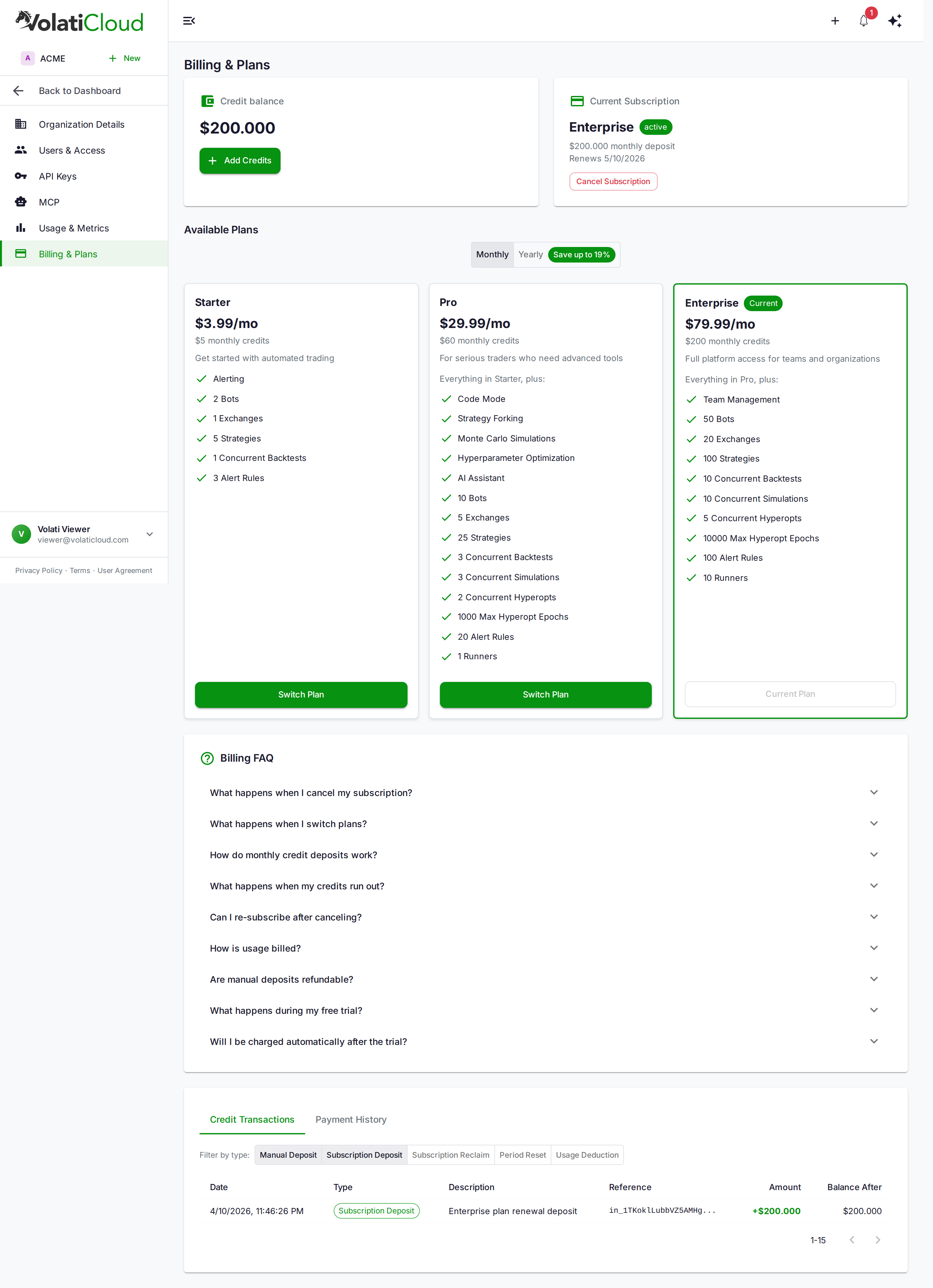
Manage everything from Organization → Billing → Available Plans.
Upgrading
Upgrades take effect immediately with prorated billing.
- Open Organization → Billing
- On the Available Plans grid, click Switch Plan on the higher tier
- Complete checkout via Stripe
Billing is prorated for the remainder of the current period — you only pay the price difference. The new plan's features (Code Mode, hyperopt, Monte Carlo, etc.), its higher caps, and its larger credit deposit are available right away.
Downgrading
Downgrades are deferred to the end of the current billing period.
- Open Organization → Billing
- On the Available Plans grid, click Switch Plan on the lower tier
- Confirm — a pending downgrade is scheduled
Until the period ends you keep full access to your current plan's features. At the next renewal the lower plan takes effect and you're billed at the new rate.
At downgrade time you may need to reduce your resources to fit within the new plan's caps. Downgrading from Pro to Starter, for example, takes you from 10 bots to 2, 25 strategies to 5, 5 connected exchange accounts to 1, 20 alert rules to 3, and 1 bot runner to 0. Existing resources over the new cap are not deleted, but you cannot create more until you are back under it.
Cancelling a pending downgrade
Changed your mind? Clear a pending downgrade before it takes effect:
- Open Organization → Billing
- On the Available Plans grid, click Switch Plan on your current plan (the one already active)
- The pending downgrade is cleared and your current plan continues unchanged
Cancellation
Cancel your subscription any time:
- Open Organization → Billing
- Click Cancel Subscription
- Confirm — the subscription enters
cancelingstatus until the end of the period
Until the period ends:
- Your bots keep running
- You retain full feature access
- You still receive the period's credits at any renewal that hasn't happened yet
When the period ends, the workspace moves to the Free plan:
- Running bots are stopped, because Free includes no bots, and they cannot be started again on Free
- Unused subscription credits are removed; manual top-ups and any unspent signup grant stay on your balance
- Backtests still run within Free's limits while you have credits left; if none remain, the organization is suspended and backtests are paused until you add credits or subscribe
- Creating bot runners, hyperopt, Monte Carlo simulation and the AI chat assistant are not on Free, so they are refused; every other limit follows the Free column of the table above
- Your data (strategies, backtests, trade history, configurations) is preserved indefinitely; new strategies count against Free's cap of 2
- The Billing page tells you which plan ended and that you are on Free
Moving to Free does not hold your plan's features for you. Everything that trades or runs continuously stops, and if your balance was all subscription credits it is left at $0, where backtests are paused as well. Plan for that before the period ends.
Subscribe again at any time to get a paid plan's features back. Your previous Stripe customer ID is reused, so saved payment methods are still available. An organization that has held a subscription cannot start another free trial.
Custom and Enterprise Plans
For organizations that need:
- More than Enterprise's caps allow — more than 50 bots, 100 strategies, 20 connected exchange accounts, or 10 bot runners
- Custom infrastructure (BYOC, dedicated nodes, regional deployments)
- SLA guarantees
- Volume pricing
- Single sign-on, SCIM, custom security review
Reach out via console.volaticloud.com to discuss custom pricing.
Invoices
Every Stripe charge produces an invoice. Find them on Organization → Billing → Invoices:
- Download PDF invoices for accounting
- Open the Stripe-hosted invoice page for line-item details
- Browse historical billing records
Related guides
- Billing Overview — Subscription + credits billing model, suspension rules.
- Credits — How credits are deducted, the no-rollover policy, and trial mechanics.
- Billing FAQ — Cancellation reclaim accounting, payment retry, deferred downgrades.