Billing FAQ
This FAQ covers the billing edge cases people hit most often: how cancellation reclaim works in dollars, what subscription_reset and subscription_reclaim entries mean, what happens to bots and credits during a deferred downgrade, and how Stripe's automatic payment retry interacts with platform access.
For background, the Billing Overview explains the subscription + credits model and the Credits page walks through the ledger in depth.
Credits and Balance
What is a credit?
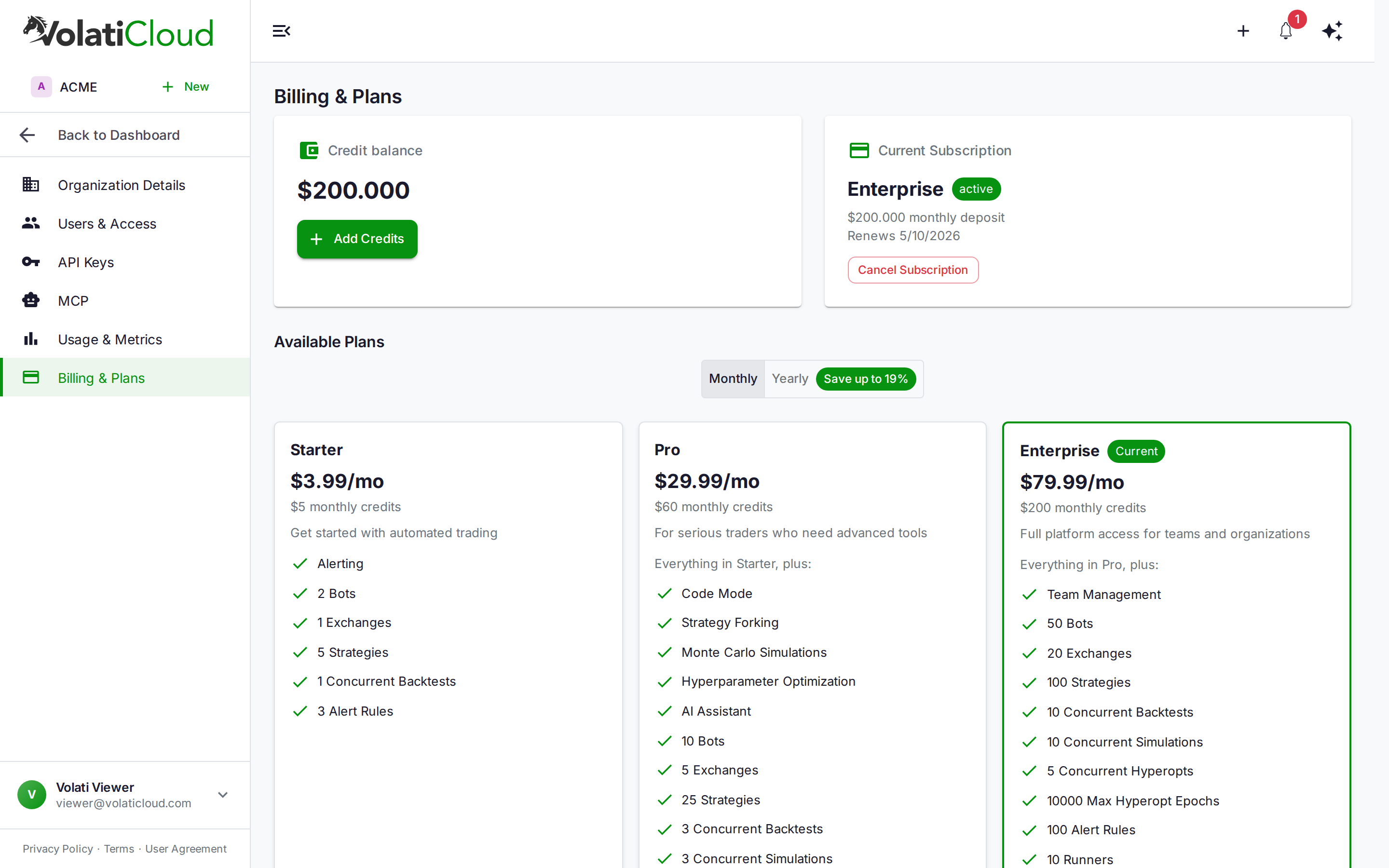
One credit equals one US dollar ($1). Credits are prepaid — they're added to your balance on subscription deposit, manual top-up, or trial start, and deducted hourly as bots and backtests consume compute resources.
How are credits deducted?
Hourly, based on what your running workloads actually consume — CPU time, memory, network egress, and storage. Stopped bots cost nothing. The Organization Usage page shows live consumption and projected end-of-period cost.
When does my organization get suspended?
Whenever the credit balance reaches zero. A subscription or trial ending can cause that, but does not by itself: its unused trial or subscription credits are removed, and the organization is suspended only if nothing is left. If credits remain, it moves to the Free plan with that balance and is not suspended. While suspended:
- All running bots are stopped immediately
- New bot starts, backtests, and hyperopt runs are blocked
- You can still sign in, view data, add manual credits, and subscribe
What is the low-credit-balance alert threshold?
A low_credit_balance alert fires when your balance drops below $5.00. This is a system alert — pre-configured for every organization and routed to the admin role by default. Adjust delivery channels and recipients on the Alerts page.
Can I still create bots when my balance is zero or my subscription is cancelled?
At a zero balance on a paid plan, yes — bot creation requires no credits. Only starting a bot or running a backtest needs credits. You can configure bots, attach strategies, and set up exchanges; they stay unstarted until you top up.
Once your subscription has ended, no. The organization is on the Free plan, whose bot and exchange caps are 0, so creating a bot or an exchange connection is refused and existing bots cannot be started. They are not deleted: subscribe to a plan that includes bots and you can start them again. The same caps apply to an organization that has never subscribed.
Do unused subscription credits carry over to next month?
No. At each renewal the system clears any leftover subscription credits before depositing the new month's allowance. Manual top-ups are unaffected and roll over indefinitely.
The reset amount on the ledger is:
cleared = MAX(0, subscription_deposited_this_period − usage_this_period)
Worked example
| Time | Manual | Subscription | Balance |
|---|---|---|---|
| Start of month (Pro plan) | $100 | $60 | $160 |
| Used $5 this month | $100 | $55 | $155 |
Renewal — subscription_reset $55 | $100 | $0 | $100 |
subscription_deposit $60 | $100 | $60 | $160 |
Manual credits never moved; subscription credits reset to a fresh $60.
This is the no-rollover policy — subscription credits are a monthly allowance, not an accumulating bank.
What is subscription_reset in my transaction history?
The negative ledger entry written at each billing renewal to clear leftover subscription credits before the new period's deposit. If there were no leftover subscription credits, a zero-amount sentinel is written instead so the operation is idempotent on retry.
What is subscription_reclaim in my transaction history?
The negative ledger entry written when subscription-provided credits are reclaimed at cancellation. As with subscription_reset, a zero-amount sentinel is written if there's nothing to reclaim.
Subscriptions
What happens to my credits when I cancel my subscription?
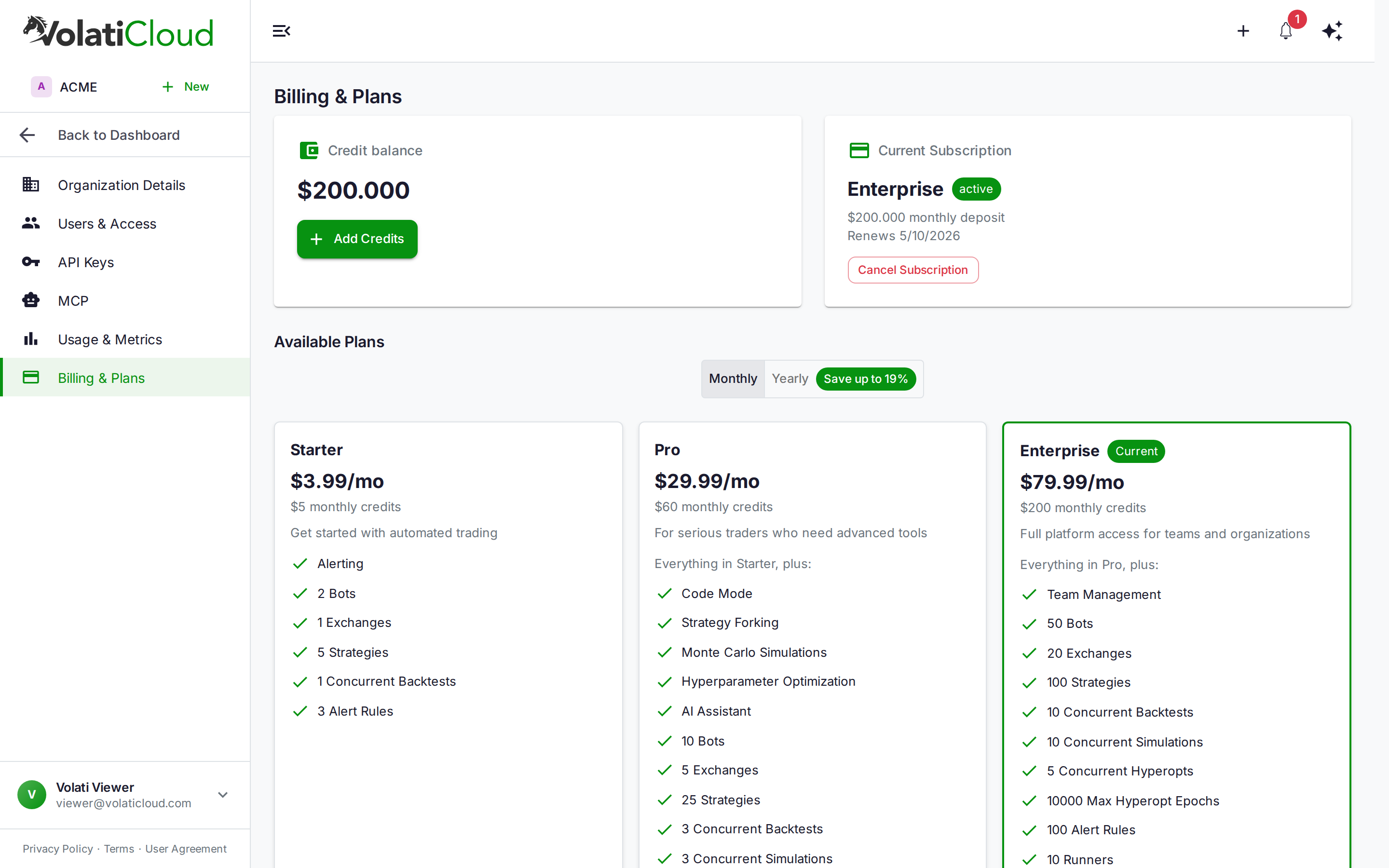
Subscription-provided credits (the monthly auto-deposits) are reclaimed when the subscription ends. Manually deposited credits are preserved and stay spendable: the organization moves to the Free plan, and backtests run on that balance within Free's limits. If the reclaim leaves nothing, the organization is suspended and backtests are paused until you add credits or subscribe.
Reclaim is calculated FIFO — usage is assumed to consume subscription credits first:
net subscription credits = MAX(0, total_subscription_deposits − total_usage_deducted)
new balance              = MAX(0, current_balance − net_subscription_credits)
Example. You have $20 balance ($30 in subscription deposits, $15 in manual deposits, $25 used). Net subscription credits = MAX(0, 30 − 25) = $5. New balance = $20 − $5 = $15 — your manual credits stay.
What can I still do after my subscription or trial ends?
The organization moves to the Free plan. Unused trial or subscription credits are removed, and what you can do next depends on whether anything is left:
| No credits left | Credits left (manual top-ups or an unspent signup grant) | |
|---|---|---|
| Plan | Free | Free |
| Balance | $0, suspended | What was left, not suspended |
| Bots | Stopped — Free includes no bots | Stopped — Free includes no bots |
| Backtests | Paused until you add credits or subscribe | Run within Free's limits |
| Creating runners, hyperopt, simulations, AI chat | Refused — not on Free | Refused — not on Free |
| Strategies and settings | Kept; new strategies count against Free's cap of 2 | Kept; new strategies count against Free's cap of 2 |
Adding credits lifts a suspension as soon as the payment succeeds. Subscribing brings back a paid plan's features. An organization that has held a subscription cannot start another free trial.
How do I resubscribe after cancelling?
Go to Organization → Billing & Plans. After cancellation every plan card shows a Subscribe button (instead of "Current Plan"), so you can resubscribe to the same plan or pick a different tier. Your previous Stripe customer ID is reused, so saved payment methods are still available.
What happens if my payment fails?
Stripe begins its automatic retry schedule and the subscription moves to past_due. A payment_failed alert fires, and the organization is on the Free plan until a payment goes through. During the retry window:
- Bots that were already running keep running while you have credits, but no bot can be started or restarted, because Free includes no bots.
- Backtests run within Free's limits while you have credits. Hyperopt, simulations and the other features Free does not include are unavailable.
- Nothing is reclaimed — your credits stay on the balance.
If a retry succeeds, the subscription returns to active and your plan's features come back. If all retries are exhausted, the subscription is cancelled and the standard cancellation flow runs.
What does "canceling" status mean?
You clicked Cancel Subscription but the cancellation takes effect only at the end of the current billing period. The subscription is still effectively active (canceling substatus) — bots keep running, you still get the period's credits if a renewal hasn't happened yet, and the billing page shows the date the subscription will actually end.
Is there a free trial?
Yes — new users can try the Pro plan free for 7 days. A payment method is collected at Stripe Checkout to start it, and nothing is charged during the trial. You receive $60 in trial credits and full Pro feature access. On day 7 the trial converts to paid Pro and your card is charged, unless you cancel before then.
See Plans & Pricing — Free Trial and Credits — Trial Credits for the full lifecycle.
What happens when the trial ends?
If you have not cancelled, the trial automatically converts to a paid Pro subscription at $29.99/mo (or the yearly equivalent if you selected yearly billing). On conversion:
- Trial credits are cleared
- A fresh $60
subscription_depositis applied - Your first Stripe invoice is generated
If you cancelled during the trial, no charge is made and the workspace moves to the Free plan: running bots are stopped, because Free includes no bots, and unused trial credits are removed. Backtests still run on Free, within its limits, while you have credits left; if none remain, they are paused until you add credits or subscribe. The same applies if the trial expires without a valid payment method — possible for a trial started before the card requirement, or if the card on file is removed or declines.
Can I cancel the trial?
Yes — any time during the 7 days from Organization → Billing → Cancel Subscription. The trial ends immediately and no charge is made. The workspace moves to the Free plan, unused trial credits are removed, and your data (strategies, backtests, history) is preserved. You can subscribe to any paid plan later, but you cannot start a second free trial.
What happens when I downgrade?
Downgrades are deferred to the end of the current billing period. Until renewal you keep full access to your current plan's features. At renewal:
- Features and caps adjust to the new plan (max bots, max strategies, Code Mode access, etc.)
- The credit deposit at renewal matches the new plan's amount
- You may need to reduce active bots or strategies to fit within the new plan's caps
See Plans & Pricing — Downgrading for the step-by-step.
Can I cancel a pending downgrade?
Yes. On Organization → Billing, find the Available Plans grid and click Switch Plan on your current plan (the one already active). The pending downgrade is cleared and the current plan continues unchanged.
Billing Alerts
What billing alerts are available?
| Alert | Trigger | Severity |
|---|---|---|
| Organization Suspended | Balance reaches zero, including when a subscription ends and leaves no credits | Critical |
| Organization Reactivated | Suspended org restored after payment | Info |
| Low Credit Balance | Balance drops below $5.00 | Warning |
| Payment Failed | Stripe invoice payment fails | Warning |
| Payment Succeeded | Subscription payment processed | Info |
| Subscription Cancelled | Subscription period ends or is deleted | Warning |
| Plan Changed | Plan upgraded or downgraded | Info |
| Trial Started | Free trial begins | Info |
| Trial Ending Soon | Trial expires in 3 days | Warning |
| Trial Converted | Trial converts to paid subscription | Info |
| Trial Expired | Trial expires without converting | Warning |
How do I configure billing alerts?
Billing alerts are system alerts — pre-configured for every organization and cannot be deleted. You can manage delivery from the Alerts page:
- Recipients — email addresses, specific users, or roles (e.g., all admins)
- Enabled / disabled — toggle alerting on or off per rule
- Cooldown — minimum time between repeated firings
- Delivery mode — immediate or batched
By default, all billing system rules notify the admin role. See Alert Rules for delivery configuration details.
Enforcement
What does each operation require?
| Operation | Plan | Credit balance > 0 |
|---|---|---|
| Start bot / restart bot | Starter or above, including the Pro trial — Free includes no bots | Yes |
| Run backtest | Any plan, including Free, within its limits | Yes |
| Run hyperopt | Pro or Enterprise, including the Pro trial | Yes |
| Create bot runner | Pro or Enterprise — the runner cap is 0 on Free and Starter | Yes |
| Create bot (configuration only) | Starter or above — Free's bot cap is 0 | No |
| View billing page | Any | No |
| Add manual credits | Any | No |
| View invoices and history | Any | No |
An organization whose subscription has ended, or whose payment is being retried, is on Free for every row of this table.
What subscription statuses allow running bots?
| Status | Plan in force | Can run bots | Backtests |
|---|---|---|---|
active | Your plan | Yes | Yes, within your plan's limits |
trialing | Pro | Yes | Yes, within Pro's limits |
canceling (deferred cancel) | Your plan, until the period ends | Yes (until period end) | Yes, within your plan's limits |
past_due (payment retry) | Free, until a retry succeeds | Bots already running continue; none can be started | Within Free's limits |
canceled | Free | No — bots are stopped | Within Free's limits |
| No subscription — the Free plan | Free | No (bot cap is 0) | Within Free's limits |
Every backtest, on every plan and status, also needs a credit balance above zero. A lapsed organization left at $0 is suspended, so its backtests are paused until it adds credits or subscribes.
"No subscription" and
canceledland on the same plan. An organization that has never subscribed and one whose subscription ended are both on Free, and both can build and backtest strategies within Free's limits. What differs is history and balance: a lapsed organization keeps itscanceledstatus on record, so it cannot start another free trial, and it holds only what was left after unused trial or subscription credits were removed.When a payment fails, the subscription moves to
past_dueand the organization is on Free until a retry succeeds. Bots that were already running continue while you have credits, but none can be started, and backtests run within Free's limits. Stripe retries automatically — if a retry succeeds, the subscription returns toactiveand your plan's features return without intervention.
Related guides
- Billing Overview — Subscription + credits model, suspension, plan changes.
- Plans & Pricing — Plan comparison, yearly discounts, trial details.
- Credits — Consumption rates, transaction types, top-up flow.