Crypto Trading Bot Alerts: Severity-Based Email Without the Noise

At 3:14 AM, your bot crashes. The exchange API key rotated, or the venue pushed an auth change, or a transient network blip put the runner in an error state. The bot stops trading. You won't find out until you open your laptop the next morning — by which point the move you wanted to capture has already happened, and the position you wanted to exit is now 4% deeper underwater. That single failure mode is the reason VolatiCloud's alerting system exists, and it's the reason the design goal is narrow: notify you immediately when something critical breaks, and stay quiet the rest of the time.
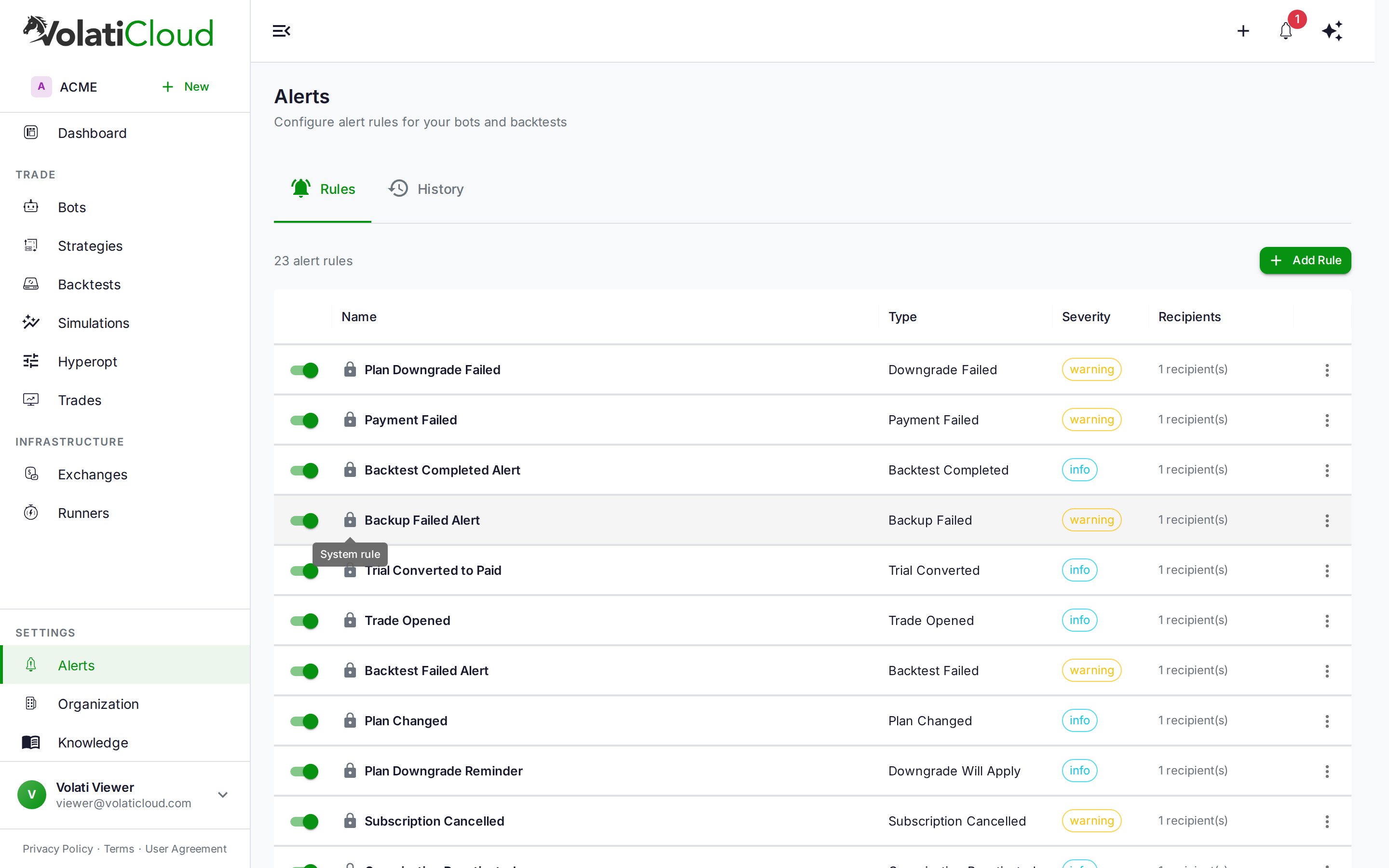
Severity-Based Crypto Trading Bot Alerts
Critical events need instant delivery. Routine events batch into digests so a successful trade close at 4 AM doesn't ping your phone. Three severity tiers, three different delivery profiles:
- Critical → immediate email, no batching, every time
- Warning → batched into intelligent digests grouped by alert type
- Info → batched at low frequency for at-a-glance review
Severity is configured per rule, not derived automatically — so you get to decide whether a bot entering error state is a Critical wake-you-up event or a Warning you'd rather see at 9 AM.
Alert Types: Bot, Trade, Risk, and Billing
VolatiCloud ships with 22+ alert types spanning bot lifecycle, trade events, risk thresholds, and billing/subscription events. The most common are listed below; the alert rules reference has the full taxonomy.
Bot Status Alerts
The most important alert family. Know immediately when:
- A bot enters error state (expired API key, exchange downtime, malformed config)
- A bot stops unexpectedly (runner-level infrastructure issue)
- A bot becomes unhealthy (running but not executing trades correctly)
Example configuration:
Alert Type: Bot Status Change
Status:     error
Severity:   Critical
Cooldown:   30 minutes
Recipients: [email protected], [email protected]
A 30-minute cooldown is the right call here — if the bot is in a restart-fail-restart-fail loop, you want one alert, not twenty.
Trade Alerts
Notifications tied to trade events:
- Any trade closes — full activity log
- Large profit — trade closes above an X% threshold
- Large loss — trade closes below a −X% threshold (one of the most useful early-warning signals)
Alert Type: Large Loss
Threshold:  −5% per trade
Severity:   Warning
Drawdown Threshold
One of the most useful risk-management tools, and the one most traders forget to set:
Alert Type: Drawdown Threshold
Threshold:  15%
Severity:   Warning
Once running max drawdown crosses 15%, you get a notification — early enough to review, intervene, or stop the bot before drawdown becomes catastrophic. Pair this with position sizing rules for compounding protection.
Daily Loss Limit
Caps single-day damage during volatile market events:
Alert Type: Daily Loss Limit
Threshold:  3%
Severity:   Critical
Particularly valuable around macro events and news-driven volatility, where a strategy may behave outside its backtested range.
Backtest Completion
Long-running backtests and hyperopt runs can take 30+ minutes. Get notified when they finish so you don't have to keep refreshing the page:
Alert Type: Backtest Completed
Severity:   Info
Smart Cooldowns Prevent Alert Storms
Alert storms are a real failure mode. A bot that errors, restarts, errors again — without cooldowns, you receive a flood of identical Critical emails and start ignoring all of them. That's worse than no alerts at all, because real failures hide in the noise.
Cooldowns suppress repeated firings of the same rule:
Cooldown: 60 minutes
Even if the alert condition triggers ten times in an hour, you receive one notification. The next alert can't fire until the cooldown expires. Recommended starting points:
- Critical bot errors — 30–60 minute cooldowns
- Drawdown / daily-loss alerts — 60+ minute cooldowns
- Trade alerts — 0–15 minute cooldowns (each trade is a distinct event you usually want to see)
Default Bot Alerts: Out-of-the-Box Coverage
Every organization is seeded with system alert rules at creation time, so you get useful defaults even before configuring custom rules:
| Rule | Severity | Default delivery |
|---|---|---|
| Bot Status Change | Info | Immediate |
| Connection Issue Alert | Critical | Immediate |
| Backtest Failed Alert | Warning | Immediate |
| Backup Failed Alert | Warning | Immediate |
| Trade Opened / Closed | Info | Batched |
| Organization Suspended | Critical | Immediate |
| Low Credit Balance | Warning | Immediate (24h cooldown) |
You can edit recipients, cooldowns, and the enabled flag on system rules — but not their core detection logic. The full default set is in the alerts overview.
In-App Notifications and Audit Trail
Email is the durable delivery channel; the in-app surfaces are for live monitoring while you're already at the keyboard.
Notification drawer. Click the bell icon in the top nav for a chronological list of recent alerts with severity badges, timestamps, and links to the triggering resource.
Toast notifications. Critical and Warning alerts surface as toasts while you're using the app — you'll see them on any page without reloading.
Alert event history. Navigate to Alerts → History for the full audit trail: every triggered alert, its delivery status (sent, recorded, suppressed, failed, pending), and which rule fired. Useful for debugging delivery issues and spotting patterns in suppressed events.
Testing Alerts Before You Need Them
The single most important thing you can do for alert reliability: test the rule before you depend on it.
- Create your alert rule and save it
- Click Test Alert on the rule
- Verify the email arrives with the correct subject, body, and recipients
- Check spam folders — first-time delivery to a new address sometimes lands there
Don't skip this. The next time you actually need the alert, it's not the moment to discover the recipient field had a typo.
Best Practices by Use Case
For solo traders:
- Enable Critical bot-error alerts on every bot
- Set a drawdown threshold at 15–20% as an early warning
- Keep cooldowns at 30–60 minutes to avoid fatigue
For trading teams:
- Route Critical alerts to a shared ops mailbox or Slack-via-email
- Use role-based recipients (e.g., the
adminrole) so new members get alerts automatically without rule edits — see the team management post for how role membership works - Assign different recipients per bot so the right person sees the right alert
For production systems:
- Always have a secondary recipient for Critical alerts (one person on vacation should not blind you to a bot crash)
- Test alerts after any infrastructure change, key rotation, or runner migration
- Review the History tab weekly to catch suppressed-alert patterns and drift
Building a Layered Alert Strategy
A useful mental model: think of alerts as layered tripwires, each at a different latency:
- Process-health tripwires (immediate). Bot status changes, connection issues, runner errors. Critical severity, 30–60 minute cooldown, redundant recipients. These are the "wake me up" alerts.
- Position-risk tripwires (immediate-to-warning). Drawdown threshold, daily loss limit, large loss per trade. Warning severity, no cooldown for the per-trade variants. These flag positions that have moved against you outside the strategy's normal envelope.
- Activity tripwires (batched). Trade open/close, profit targets hit, backtest completion. Info severity, batched delivery. These are the "review at end of day" notifications.
Layering keeps your inbox quiet without blinding you to the events that matter. Pair this with real-time bot monitoring — alerts are the push-based half; live dashboards are the pull-based half.
Common Alert Pitfalls
A few patterns that defeat the purpose of alerting:
Setting drawdown thresholds too low. A 5% drawdown alert on a strategy whose normal monthly drawdown is 8% just generates noise. Backtest first, then set the threshold above your strategy's typical worst month — but well below the figure you'd consider catastrophic.
Too few recipients on Critical alerts. One person on vacation should not blind you to a bot crash. Always have a secondary recipient — a shared ops mailbox, an oncall rotation, or a teammate.
Skipping the test step. First-time email delivery to a new address sometimes routes to spam, the from-address may be blocked at your domain, recipient field typos slip through. Always test before depending on a rule.
Treating Info alerts as Critical. If everything is Critical, nothing is. Use the severity tiers as designed — most events are Info or Warning.
Alerts are available on every plan. Open the console, navigate to your bot's Alerts section, and start with the default rules before adding custom thresholds. The Test Alert button is there for a reason — use it before you rely on a rule in production.
Related guides
- Alerts Overview — Notification channels, alert event history, and the full alert taxonomy.
- Alert Rules — Create and configure alert rules, severity levels, and cooldowns.
- Bot Monitoring — Real-time metrics and log streaming for running bots.