Automated DCA Crypto Bot: Build a Dollar-Cost Averaging Strategy

Two of the hardest problems in crypto trading are knowing when to buy and having the discipline to actually do it. Dollar-cost averaging removes both. Instead of trying to time the bottom, a DCA bot buys fixed amounts at regular intervals — and a well-configured strategy keeps buying through the crash that would have stopped you out manually. The trick is making it more than "buy every Friday and hope": signal-enhanced DCA layers oversold confirmation on top of scheduled accumulation, and a maximum-loss backstop ensures it can't run forever in the wrong direction.
What Dollar-Cost Averaging Actually Does
Dollar-cost averaging (DCA) is the practice of purchasing a fixed dollar amount of an asset at regular intervals, regardless of price. When price drops, your fixed amount buys more units; when it rises, it buys fewer. Over time, your average entry cost is typically lower than a single lump-sum purchase placed at the wrong moment.
DCA has a strong track record in crypto specifically:
- Crypto is volatile — prices swing 20–40% in weeks, making precise timing nearly impossible.
- Long-term trends dominate short-term noise — for assets with structural demand, buying consistently through drawdowns has historically proved profitable.
- Emotion removal — the hardest part of trading is not selling during panic. Automation handles that completely.
But DCA isn't just "buy every week and hold." Sophisticated DCA bots add layers: sizing additional entries based on RSI oversold signals, taking partial profits as price recovers, distributing buys across pairs and exchanges, and capping the maximum drawdown the strategy can tolerate before cutting the position.
Manual DCA vs. Automated DCA
Most retail traders DCA manually — calendar reminder, open the exchange, place a market order. The limitations are obvious:
| Approach | Timing Consistency | Entry Precision | Opportunity Capture | Emotional Risk |
|---|---|---|---|---|
| Manual DCA | Low — skipped or delayed entries | Low — market orders at any price | Low — miss dips while sleeping | High — skips during crashes |
| Basic automated DCA | High | Medium — executes on schedule | Medium | None |
| Signal-enhanced automated DCA | High | High — buys on confirmed dips | High | None |
An automated DCA bot runs 24/7, executes exactly when conditions are met, and never skips a buy because charts "look scary." Signal-enhanced DCA goes further: the bot opens its initial position only when the asset is in oversold territory, then adds to it as price drops further.
How DCA Works in VolatiCloud
VolatiCloud uses Freqtrade as its trading engine, which has first-class support for DCA through its position adjustment system. The key parameters:
{
  "stake_amount": "unlimited",
  "tradable_balance_ratio": 0.99,
  "max_open_trades": 3,
  "position_adjustment_enable": true,
  "max_entry_position_adjustment": 3
}
position_adjustment_enable— Allows the bot to add to an existing open position (the mechanism behind every DCA entry)max_entry_position_adjustment— Maximum number of additional buys per trade.3means an initial entry plus three DCA buysmax_open_trades— How many pairs you're accumulating simultaneously
With these settings, a bot managing BTC/USDT could enter at $90,000, add at $85,500, $81,225, and $77,164 — lowering the average cost from $90,000 to roughly $83,472 before price turns around. For a feature-level overview of running this position-adjustment approach on the managed platform, see the DCA bot page on volaticloud.com.
DCA Entry Logic in Code Mode
VolatiCloud's Code Mode lets you implement adjust_trade_position(), which Freqtrade calls on each candle for every open trade. A simple approach that buys more whenever the trade drops another 5%:
def adjust_trade_position(self, trade, current_time, current_rate,
                          current_profit, min_stake, max_stake,
                          current_entry_rate, current_exit_rate,
                          current_entry_profit, current_exit_profit,
                          **kwargs):
    # DCA thresholds: -5%, -10%, -15% from initial entry
    dca_thresholds = [-0.05, -0.10, -0.15]
    count_of_entries = trade.nr_of_successful_entries

    if count_of_entries > len(dca_thresholds):
        return None  # All DCA buys exhausted

    next_threshold = dca_thresholds[count_of_entries - 1]
    if current_profit > next_threshold:
        return None  # Not down enough yet

    # Each DCA buy matches the initial stake
    return trade.stake_amount
This is the floor. A production DCA strategy typically increases stake size per entry (1×, 1.5×, 2×, 3× of the initial stake) to weight the average cost more aggressively toward the lowest price point.
Configuring a DCA Strategy in VolatiCloud
Step 1: Choose Your Pairs
Start with high-liquidity assets. BTC, ETH, and top-20 pairs by market cap have survived every market cycle. Small-cap tokens carry delisting risk that can turn a DCA position into a permanent loss. VolatiCloud's multi-exchange support means you can run the same DCA config across Binance, Kraken, and Bybit simultaneously — useful for spreading execution across liquidity pools.
Step 2: Define Your Initial Entry Signal
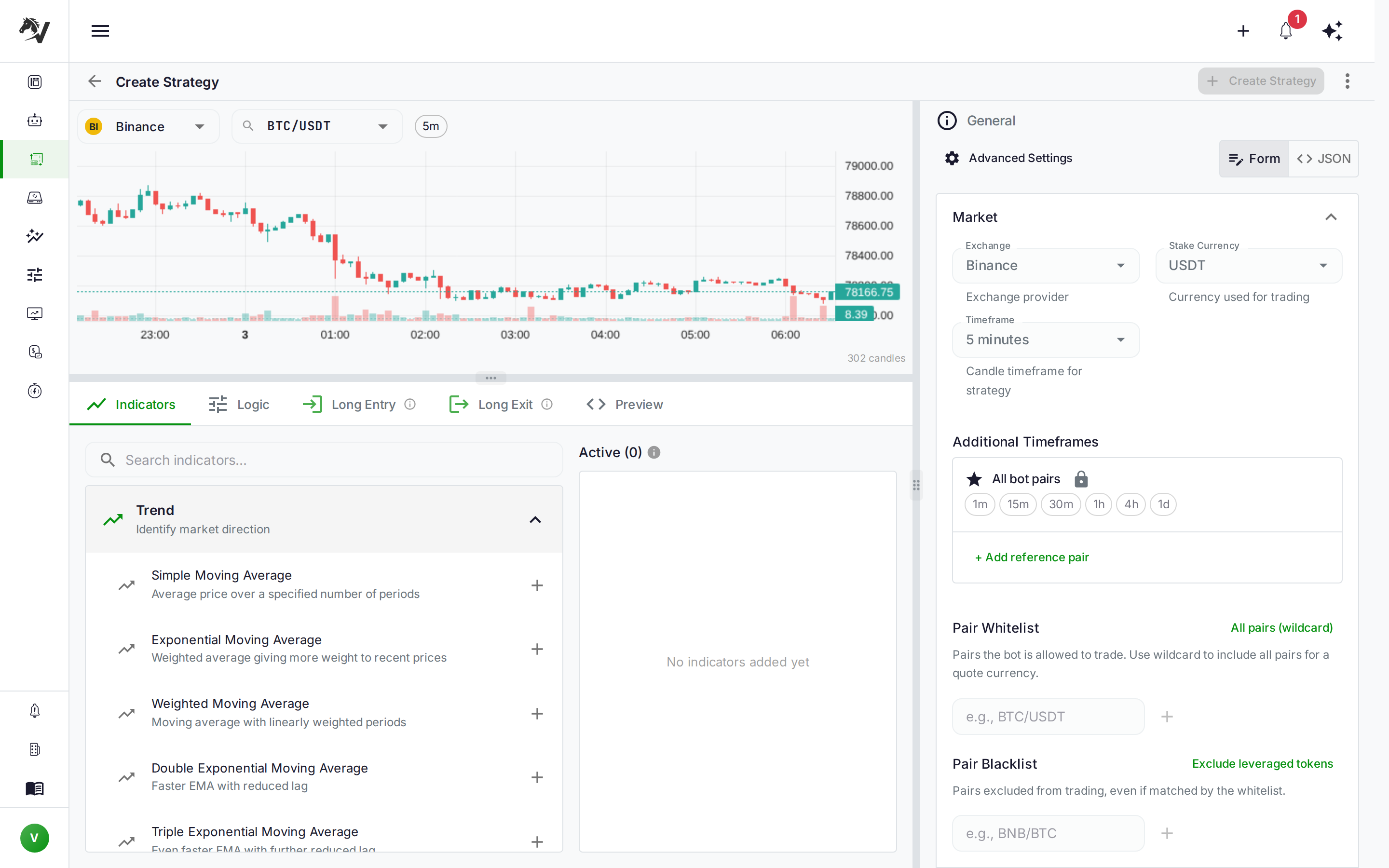
A pure DCA bot buys on a fixed schedule. Signal-enhanced DCA opens the initial position only when conditions are favorable. When you build the strategy in the UI Builder, combine these conditions with AND nodes — no code required:
- RSI < 35 — Open the first position only when the asset is already in oversold territory
- Price below the 200-period SMA — Require a broader downtrend before accumulating
- Volume spike — Confirm interest with above-average volume on the entry candle
The entry signal controls when you start accumulating. The adjust_trade_position() logic controls how many times you add and at what thresholds.
Step 3: Define Your Exit
DCA profits when the position eventually recovers above your average cost. Common exit approaches:
- ROI table — Freqtrade's built-in ROI targets exit at progressively lower profit thresholds the longer a trade runs (e.g., 8% after 1 hour, 5% after 1 day, 3% after 3 days). Captures partial recoveries without waiting for full return to entry.
- Trailing stop — Once the position turns profitable, activate a trailing stop to lock in gains as price rises.
- Signal reversal — Exit when RSI crosses back above 50 or price closes above the 200 SMA.
DCA without a maximum loss limit can turn manageable drawdowns into account-destroying losses. Set a stoploss — even a wide one like -0.35 — to cap the worst case before your DCA entries lower the effective stop price further.
Step 4: Backtest Before Going Live
This is where most DCA strategies prove themselves or fail. Backtest across multiple regimes:
- 2024 Q4 bull run — Verify the strategy doesn't over-trade in strong uptrends
- 2022 bear market — Confirm the stoploss prevents catastrophic losses during prolonged downtrends
- 2023 sideways consolidation — Check that DCA entries recover within a reasonable window
In VolatiCloud's backtesting dashboard, include all target pairs in a single configuration. Pay particular attention to max drawdown and capital utilization — a DCA bot can tie up 4–8× your base stake per open position when all entries trigger.
Key Metrics to Evaluate in a DCA Backtest
| Metric | What to Look For |
|---|---|
| Win rate | DCA strategies typically hit 75–90%. If lower, review your exit conditions |
| Average profit per trade | Should exceed trading fees by a comfortable margin (aim for 2%+) |
| Max drawdown | How deep does the open position go before recovery? Model your worst case |
| Capital in use | stake_amount × max_open_trades × (1 + max_entry_position_adjustment) — must fit your balance |
| Trade duration | Long open trades signal the strategy needs wider profit targets or better exits |
Compare DCA backtest results against a simple buy-and-hold baseline for the same period. DCA should show lower drawdown and a smoother equity curve, even if raw returns are similar — that reduced volatility is the actual value of the strategy.
Risk Management for DCA Bots
DCA's main risk is the "permanent drawdown" scenario: the asset you're accumulating doesn't recover. This has happened in crypto with delisted coins, failed projects, or assets that entered multi-year downtrends.
Practical mitigations:
-
Limit pairs to liquid, established assets. Focus on assets with years of history and active development. Diversifying across 3–5 such pairs reduces single-asset risk.
-
Set a hard stoploss. A
-30%stoploss means that if BTC falls 30% from your average cost (which will be lower than your initial entry thanks to DCA), the position closes automatically. -
Cap maximum open positions. With
max_open_trades: 3and 4 entries per position, 12× your base stake could deploy simultaneously. Size yourstake_amountaccordingly so the bot never risks more than you're comfortable losing in the worst case. -
Monitor balance requirements in real time. VolatiCloud's monitoring dashboard shows open trades with current P/L, number of DCA entries made, and remaining available balance. If available balance drops toward the point where a DCA entry would fail, you'll see it before it becomes a problem.
For a deeper treatment of position sizing, see the risk management and position sizing guide.
DCA Across Multiple Pairs and Exchanges
One of VolatiCloud's practical advantages for DCA is running the same configuration across multiple pairs simultaneously. A single bot can accumulate BTC/USDT on Binance while accumulating ETH/USDT on Kraken under the same DCA logic — different price feeds, different order books, same strategy.
Multi-pair DCA also creates natural diversification. If BTC is trending up and not triggering your RSI entry, ETH or SOL might be in an oversold condition that qualifies. Capital deploys where conditions are right rather than sitting idle waiting for one specific pair to dip. For a portfolio-level treatment, see the multi-bot orchestration guide.
To compare per-pair DCA performance, include all target pairs in a single backtest run. The results dashboard shows each pair's individual contribution so you can drop underperformers before going live.
When DCA Works (and When It Doesn't)
DCA isn't universally applicable. It performs best in specific conditions:
DCA works well when:
- The asset is high-quality with a positive long-term trajectory
- The market is in a cyclical correction, not a structural downtrend
- You have sufficient reserve capital to fund multiple DCA entries without straining the account
- Your time horizon is measured in weeks or months, not hours
DCA underperforms when:
- The asset enters a prolonged bear market — you accumulate losses, not opportunities
- Capital is tight and can't fund follow-on entries consistently
- The initial position size is so large that DCA entries would over-concentrate the portfolio
- You're trading very short timeframes where recovery cycles are slow relative to candle interval
Walk-forward optimization is essential for DCA. Thresholds that worked in 2024 may not work in 2026.
Get Started with DCA on VolatiCloud
-
Set up a runner. DCA bots need historical data for their pairs. Before running your first backtest, check the Runner Data tab for full coverage.
-
Start with paper trading. Enable dry-run mode to observe how the bot handles real market conditions without risking capital. The paper trading guide explains how to interpret dry-run results.
-
Backtest across market cycles. Test across at least two years of data including a bear market period. DCA only looks good if it survives the down cycles, not just the up ones.
-
Start with a conservative stake ratio. Set
tradable_balance_ratioto 0.1–0.2 initially. Once you've validated bot behavior in live conditions, scale up incrementally.
Open the VolatiCloud console to create your first DCA strategy. The visual builder handles entry and exit logic without code, and the backtester runs multi-entry DCA simulations across any date range and pair list.