Multi-Timeframe Crypto Strategies: Higher-TF Context for Bots

A bot running on the 5-minute chart has no idea what the 1-hour trend is doing. It will buy breakouts that fight the prevailing trend, hold through reversals that a higher-timeframe RSI would have flagged, and miss entries that only make sense once you zoom out. Multi-timeframe analysis is one of the most effective ways to add context to a strategy — and VolatiCloud now supports it natively, both in code and in the visual builder.
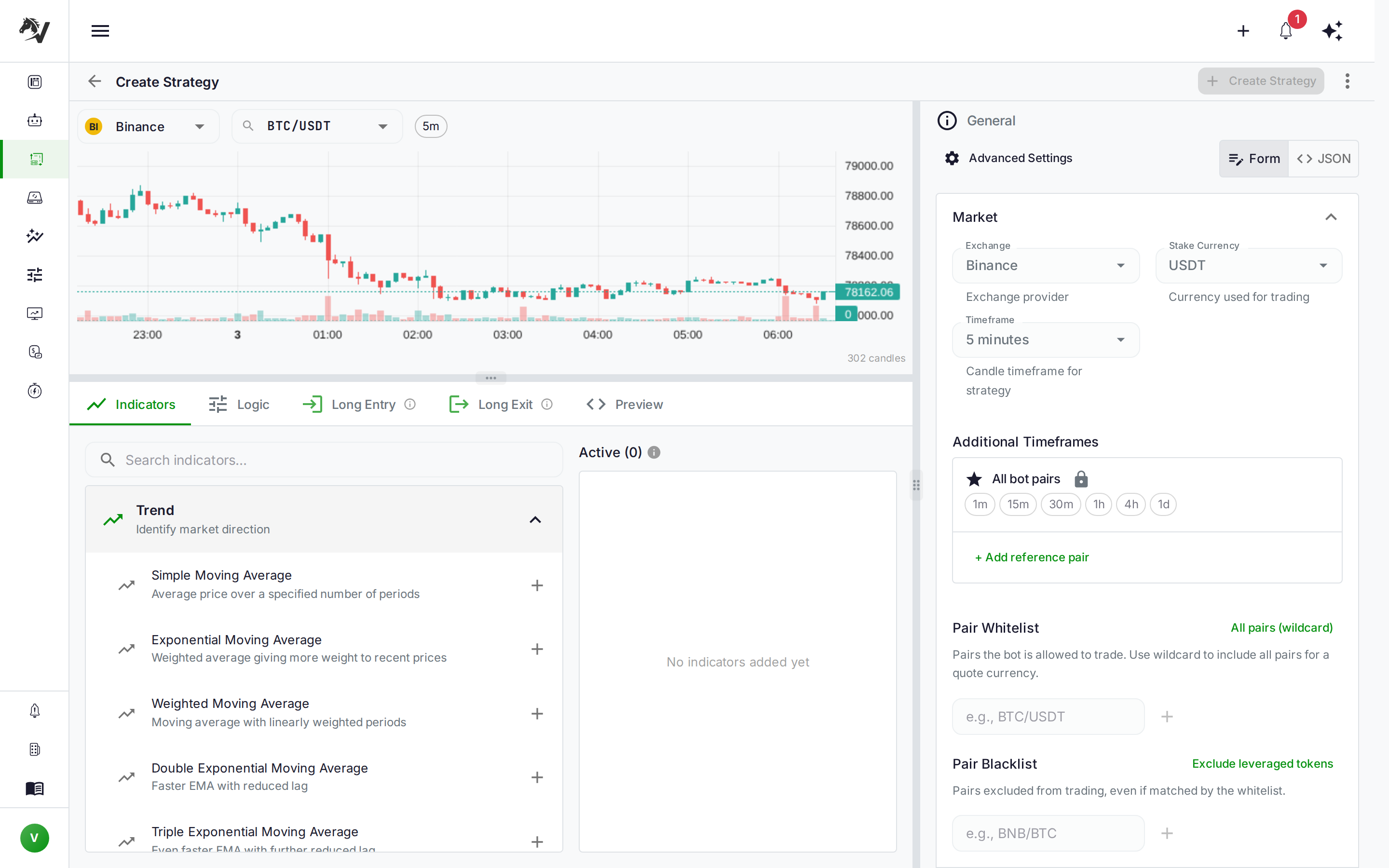
This post explains what multi-timeframe strategies are, how Freqtrade's informative_pairs mechanism works under the hood, and how to configure it in VolatiCloud — both in code mode and through the visual Strategy Builder.
Why Single-Timeframe Strategies Have Blind Spots
The 5m RSI crossover looks good in isolation. The 1h chart is in a clear downtrend. The bot buys anyway. Three candles later, the trade is stopped out.
This is the most common failure mode for single-timeframe strategies: they react to noise while ignoring the dominant trend. A 5-minute RSI reaching oversold is meaningful when the 1-hour chart is consolidating in an uptrend. The same signal is noise when the 1-hour is rolling over.
Multi-timeframe (MTF) analysis fixes this by pulling context from one or more higher timeframes into the entry logic. You keep your primary execution timeframe (say, 5m), but filter entries using conditions derived from the 1h or 4h. The higher timeframe acts as a gatekeeper: it doesn't tell you when to enter, only whether the environment is right for the type of trade you're looking at.
How Freqtrade's Multi-Timeframe API Works
Freqtrade strategies access other timeframes through two mechanisms:
informative_pairs()method — declares which pairs and timeframes the strategy needs. Freqtrade uses this list to pre-fetch OHLCV before backtesting starts.@informative(tf)decorator — decorates apopulate_indicators_<tf>method; Freqtrade automatically resamples that timeframe's data and merges the resulting indicators into the main dataframe with_<tf>-suffixed column names.
A typical implementation in Code Mode:
def informative_pairs(self):
    return [("BTC/USDT", "1h"), ("BTC/USDT", "4h")] + [
        (pair, "1h") for pair in self.dp.current_whitelist()
    ]

@informative("1h")
def populate_indicators_1h(self, dataframe, metadata):
    dataframe["rsi"] = ta.RSI(dataframe, timeperiod=14)
    return dataframe

def populate_entry_trend(self, dataframe, metadata):
    # Access 1h RSI in the 5m dataframe as rsi_1h
    dataframe.loc[
        (dataframe["rsi"] < 35) &        # 5m RSI oversold
        (dataframe["rsi_1h"] > 45),       # 1h RSI not in a downtrend
        "enter_long"
    ] = 1
    return dataframe
The dp.current_whitelist() call resolves at runtime to whatever pairs the bot is currently trading. For backtesting, Freqtrade uses the backtest pair list. This is the wildcard behavior — declare once, apply to all traded pairs.
Declaring Informative Pairs in VolatiCloud
VolatiCloud exposes this mechanism through the Informative Pairs section in the strategy configuration editor. The data model is a JSON array stored inside the strategy's FreqtradeConfig:
{
  "stake_currency": "USDT",
  "timeframe": "5m",
  "informative_pairs": [
    { "pair": "*",        "timeframes": ["1h", "4h"] },
    { "pair": "BTC/USDT", "timeframes": ["1h", "4h", "1d"] }
  ]
}
| Field | Value | Meaning |
|---|---|---|
pair | "*" | Every pair in the bot's trading whitelist |
pair | "BTC/USDT" | This specific pair, always — useful for market regime indicators |
timeframes | ["1h", "4h"] | These timeframes are fetched for that pair |
The pair: "*" entry is the most common. It tells the system: "whatever pairs this bot trades, also download 1h and 4h data for each of them." Concrete pair entries — like BTC/USDT — are for strategies that use Bitcoin as a market-condition indicator regardless of what the bot is trading.
The field passes through verbatim to Freqtrade's config.json. Code-mode strategies can read self.config["informative_pairs"] from inside their own informative_pairs() method to avoid declaring the same data twice.
Using the Informative Pairs Editor
In the strategy editor, the Informative Pairs section lets you manage rows without touching JSON:
- Open a strategy and go to the Config tab
- Scroll to Informative Pairs (below the timeframe and trading mode settings)
- Click Add row — this creates a wildcard entry (
pair: *) with no timeframes selected - Click the timeframe chips to select which timeframes you need (
15m,1h,4h, etc.) - Change the pair field to a concrete ticker (e.g.,
BTC/USDT) if you want a market-regime reference pair
The editor validates that each declared timeframe is distinct from the primary timeframe (adding the primary TF as an informative pair is redundant and is stripped). It also deduplicates across rows — if two wildcard entries both include 1h, they're collapsed.
Per-Indicator Timeframes in the Strategy Builder
For UI Builder strategies, VolatiCloud goes one step further: you attach a timeframe directly to an indicator node.
In the Indicators tab, each indicator now has a Timeframe dropdown. Leave it blank and the indicator uses the primary timeframe as before. Select 1h and that indicator is computed on 1h candles and available under the _1h suffix in your conditions.
The codegen engine uses per-indicator timeframes to automatically:
- Populate
informative_pairsin the config — you don't add them manually; the builder derives them from your indicator configuration - Emit
@informative(tf)decorator blocks in the generated Python — each distinct non-primary timeframe becomes a dedicated decorated method - Merge results into the main dataframe with correct column naming so conditions can reference
rsi_1h,ema_4h, and similar suffixed columns
Drop an EMA indicator, set its timeframe to 1h, reference it in an entry condition, and the generated strategy handles the Freqtrade multi-timeframe machinery without any manual configuration.
Data Availability for Backtests and Hyperopt
This is where the backend changes matter most. When you run a backtest on a strategy that declares informative pairs, VolatiCloud validates data availability for all declared timeframes, not just the primary one.
The check works like this:
pair: "*"entries expand against the backtest's pair list- The primary timeframe is excluded (it's already validated separately)
- Duplicates across entries are deduplicated
- The full
(pair, timeframe)set is checked against what your runner has downloaded
If any combination is missing, the backtest reports a data-availability error before it starts — the same early-gate behavior you already get for the primary timeframe. No more discovering halfway through a run that the 4h data is incomplete.
If you're using a 5m strategy with 1h informative pairs, your runner needs 1h OHLCV for every pair in your trading whitelist. The historical data availability post explains how to check what data is present on a given runner, and the market data lake post covers the underlying download infrastructure.
Hyperopt follows the same pattern. The optimizer pre-validates all informative pair data before starting the search — preventing the class of failure where a run crashes mid-optimization because a higher-timeframe file is missing.
Live Bots: No Pre-Seeding Required
For live and dry-run bots, this is a non-issue. Freqtrade fetches OHLCV (including informative pairs) directly from the exchange at each candle tick — using the exchange's public API. You don't pre-seed any data; the bot handles it at runtime through Freqtrade's DataProvider.
The data-availability requirement applies exclusively to backtesting and hyperopt, where there is no live exchange connection and all historical data must be present on disk. During live trading, dp.get_pair_dataframe("BTC/USDT", "4h") fetches from the exchange in real time.
Common Multi-Timeframe Patterns
Higher-Timeframe Trend Filter
The most widely used MTF pattern. Execute entries on a fast timeframe, only when the higher timeframe agrees with the direction.
{
  "timeframe": "5m",
  "informative_pairs": [
    { "pair": "*", "timeframes": ["1h"] }
  ]
}
Entry logic: 5m RSI below 35 (oversold signal) AND 1h EMA(50) rising (trend confirmation). This eliminates counter-trend long entries in downtrending markets. See EMA crossover trend following for how to build the 1h trend detection piece.
BTC Market Regime
Many altcoin strategies use Bitcoin as a macro filter. When BTC is in a downtrend, all long trades are suppressed regardless of the individual pair signal.
{
  "timeframe": "15m",
  "informative_pairs": [
    { "pair": "*",        "timeframes": ["1h"] },
    { "pair": "BTC/USDT", "timeframes": ["4h", "1d"] }
  ]
}
Entry filter: 15m signal on the traded pair, only if BTC/USDT 4h EMA(21) > EMA(55). This prevents entering altcoin longs during broad market drawdowns, which historically account for a disproportionate share of losing trades in altcoin strategies.
Multi-Timeframe Confluence
Require the same signal direction across multiple timeframes before entering.
{
  "timeframe": "5m",
  "informative_pairs": [
    { "pair": "*", "timeframes": ["15m", "1h"] }
  ]
}
Entry: RSI below 35 on 5m AND RSI below 50 on 15m AND price above EMA(50) on 1h. Each condition tightens criteria. Fewer signals, but the ones that fire have three timeframes aligned — a meaningful filter for breakout strategies and other high-conviction systems.
A Note on Backtest Window Sizing
One detail that matters when backtesting multi-timeframe strategies: the higher-timeframe indicators need enough candles to compute correctly. A 1h EMA(50) needs at least 50 hours of 1h data to produce a valid value. A 4h EMA(200) needs 33 days of 4h data.
If your backtest window is too short, the first portion of your results will contain NaN values for higher-timeframe indicators — and Freqtrade will skip those entries, which silently skews the backtest toward a shorter effective date range than you intended.
For strategies using 1h and 4h timeframes, a minimum 3-month backtest window produces reliable results. For 1d informative pairs, use at least 12 months.
Walk-forward optimization handles this correctly by design — its rolling in-sample windows are sized relative to the slowest indicator in the strategy.
Building a Multi-Timeframe Strategy: Step by Step
In VolatiCloud's UI Builder, the complete flow for a 5m+1h confluence strategy:
- New strategy → Select UI Builder mode → Set primary timeframe to
5m - Indicators tab → Add RSI (period 14) — leave timeframe blank (primary 5m)
- Indicators tab → Add EMA (period 50) → set timeframe to
1h. The builder auto-adds{ "pair": "*", "timeframes": ["1h"] }to your config - Logic tab → Entry condition:
RSI < 35ANDclose > EMA_1h(price above the 1h trend EMA) - Config tab → Verify the Informative Pairs section shows the
*→1hentry - Save → Backtest — The data-availability gate now checks 5m and 1h data for every pair in your whitelist before the run starts
This is the same structure used by NFI, TrueRange, and many other popular Freqtrade community strategies — without writing a line of Python.
Multi-Timeframe Support Is Live
The Informative Pairs editor and per-indicator timeframe selection are available now. Open any strategy in the VolatiCloud console, go to the Config tab, and look for the Informative Pairs section. For UI Builder strategies, select a timeframe on any indicator in the Indicators tab.
The Strategy Builder documentation covers the full indicator configuration flow. For a refresher on how the backtest data-availability gate works once your strategy declares informative pairs, see historical data availability.