Trading Bot API: Programmatic Control with OAuth 2.0

Manually clicking through a dashboard to start 12 bots before the New York open is not algorithmic trading — it's manual trading with extra steps. VolatiCloud's API client system gives you OAuth 2.0 client_credentials authentication for the entire GraphQL surface, so any script, CI pipeline, or external dashboard can manage bots, trigger backtests, and pull live performance data without a browser in the loop.
What Is a VolatiCloud API Client?
An API client is a machine identity — a client_id and client_secret pair your scripts use to authenticate with VolatiCloud. Unlike user accounts, API clients are non-interactive: they authenticate via the OAuth 2.0 client_credentials grant, which exchanges the credentials for a short-lived JWT access token without a browser, MFA prompt, or human in the loop.
This model fits the workflows you actually want to automate:
- Scheduled pipelines that fork strategies, run backtests, and email digests
- External dashboards (Grafana, Metabase, internal tools) pulling live trading metrics
- CI systems that validate strategy configurations before promoting them to live bots
- Multi-bot orchestration scripts that start, stop, or rebalance dozens of bots based on portfolio rules
How the OAuth client_credentials Flow Works
The client_credentials grant is the OAuth 2.0 flow designed for server-to-server communication, with no end-user involved. The sequence is short:
- Your application POSTs
client_id,client_secret, andgrant_type=client_credentialsto Keycloak's token endpoint. - Keycloak validates the credentials and returns a signed JWT access token (typically 5-minute lifetime).
- Your application includes that token in the
Authorization: Bearer <token>header on every GraphQL request. - When the token expires, your application requests a new one. SDKs typically cache and refresh automatically.
A direct curl example:
curl -X POST https://keycloak.volaticloud.com/realms/volaticloud/protocol/openid-connect/token \
  -d "grant_type=client_credentials" \
  -d "client_id=your-client-id" \
  -d "client_secret=your-client-secret"
The response includes an access_token field. Pass that token as a Bearer header on GraphQL requests to https://api.volaticloud.com/query.
Creating an API Client in the Console
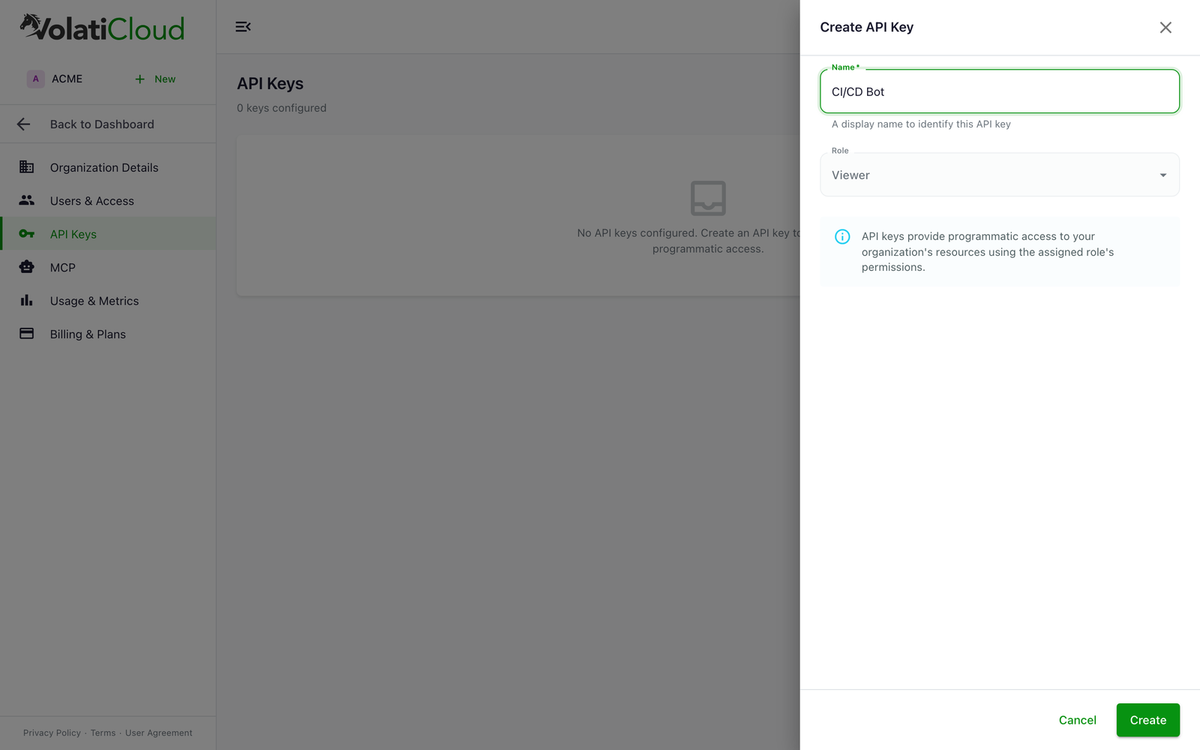
API clients are managed from Organization Settings → API Clients in the VolatiCloud console. Only organization administrators with the manage-api-clients permission can create or revoke clients — the action is audit-logged.
To create a new client:
- Open your organization in console.volaticloud.com.
- Navigate to Settings → API Clients.
- Click New API Client and give it a descriptive name. Match the name to its job:
backtest-pipeline,grafana-readonly,slack-trade-bot. - Copy the generated client secret immediately — VolatiCloud only shows it once. Lose it and you delete the client and recreate it.
Each client is scoped to your organization. It inherits the resource visibility rules of an organization member: the same bots, strategies, and exchanges are visible. It cannot escalate beyond what your organization plan allows.
Treat the client secret like a database password. Store it in environment variables, AWS Secrets Manager, GitHub Actions secrets, or 1Password — never in source files or commit history. Rotation is a delete-and-recreate.
Practical Example: Triggering a Backtest from Python
Here's a minimal Python example that authenticates and triggers a backtest via the GraphQL API:
import requests

TOKEN_URL = "https://keycloak.volaticloud.com/realms/volaticloud/protocol/openid-connect/token"
API_URL   = "https://api.volaticloud.com/query"

def get_token(client_id: str, client_secret: str) -> str:
    resp = requests.post(TOKEN_URL, data={
        "grant_type": "client_credentials",
        "client_id": client_id,
        "client_secret": client_secret,
    })
    resp.raise_for_status()
    return resp.json()["access_token"]

def run_backtest(token: str, strategy_id: str) -> dict:
    query = """
    mutation RunBacktest($strategyId: ID!, $config: BacktestConfigInput!) {
      createBacktest(strategyId: $strategyId, config: $config) {
        id
        status
      }
    }
    """
    variables = {
        "strategyId": strategy_id,
        "config": {
            "timeframe": "1h",
            "startDate": "2024-01-01",
            "endDate":   "2024-12-31",
            "pairs":     ["BTC/USDT"],
        },
    }
    resp = requests.post(
        API_URL,
        json={"query": query, "variables": variables},
        headers={"Authorization": f"Bearer {token}"},
    )
    resp.raise_for_status()
    return resp.json()

token  = get_token("your-client-id", "your-client-secret")
result = run_backtest(token, strategy_id="abc123")
print(result)
The same pattern works in Node.js, Go, Rust, or any language with an HTTP client. The GraphQL surface is identical whether you're authenticated as a user via the dashboard or as an API client via a token — same queries, same mutations, same error shapes.
What Can API Clients Do?
API clients have access to the full VolatiCloud GraphQL API, subject to your organization's plan limits. Common patterns:
| Use Case | GraphQL Operation |
|---|---|
| List all bots and their status | query { bots { id name status } } |
| Start or stop a bot | mutation { startBot(id: "...") { status } } |
| Create and monitor backtests | mutation { createBacktest(...) { id } } |
| Query equity curve data | query { backtest(id: "...") { results { equityCurve } } } |
| Fetch open trades for a bot | query { bot(id: "...") { trades { pair profit } } } |
| Create strategies | mutation { createStrategy(...) { id } } |
| Run hyperparameter optimization | mutation { runHyperopt(...) { id } } |
Sensitive fields — like exchange API keys stored in bot configs — are protected by the view-secrets scope, which API clients do not receive by default. This means analytics scripts can read bot status and performance data with zero risk of leaking the credentials underneath.
Security Model
VolatiCloud API clients are backed by Keycloak's client_credentials grant, which provides:
- Short-lived tokens — access tokens expire on the order of minutes, limiting damage if a token leaks via logs or an error report
- Scope isolation — API clients cannot access user-owned resources outside your organization
- Instant revocation — any organization admin can revoke a client from the console; in-flight tokens stop validating within seconds
- Easy rotation — delete the client and recreate it; your other clients keep working
If you need different permission levels for different jobs — a read-only Grafana scrape versus a CI pipeline that can start bots — create separate API clients with role-appropriate scopes. You can revoke them independently if anything looks off in the audit log.
Name API clients after their purpose AND the system that consumes them: grafana-readonly, github-deploy-pipeline, weekly-backtest-cron. When something unexpected fires at 3am, the audit log will tell you exactly which job did it.
Combining API Access with VolatiCloud Workflows
API clients pay for themselves once you start composing them with the rest of the platform.
Automated backtest validation in CI. After every strategy code change, your CI pipeline runs a backtest via API and fails the build if Sharpe ratio, profit factor, or max drawdown move beyond your thresholds — before the change ever reaches a live bot. The backtesting deep dive covers which metrics are worth gating on.
Scheduled hyperopt loops. Submit hyperparameter optimization jobs on a cron, pull the results when they finish, and post the top-3 parameter sets to Slack. Strategy tuning becomes part of your data pipeline rather than a manual ritual. The hyperparameter optimization post explains what the API exposes for ranges, epochs, and result shapes.
Multi-bot portfolio orchestration. Run a script that queries all bot statuses every few minutes and pauses entries on bots whose drawdown crosses a threshold, or that stops a whole exchange's worth of bots when a custom market-condition signal flips. The multi-bot portfolio guide goes deeper on the pattern.
Conversational control via MCP. If you'd rather have an AI agent drive these calls instead of writing Python, the VolatiCloud MCP server exposes the same operations to Claude, Cursor, and other MCP clients — same authorization, different interface.
Get Started
API clients are available to all organization administrators on any VolatiCloud plan. Creating a client takes about 30 seconds from the console. If you're new to VolatiCloud, the quick-start guide walks through setting up your first bot — once that's running, you can immediately start managing it programmatically.
The full GraphQL schema — every query, mutation, and type — is reachable via the API explorer at https://api.volaticloud.com/query once you have a valid token, and documented in the API reference.
Create your first API client at console.volaticloud.com and replace your first dashboard click with a script.