VolatiCloud Plans Explained: How the Subscription + Credits Model Works

Before you deploy real capital, it's worth spending five minutes understanding how platform costs work. VolatiCloud uses a two-layer billing model — a monthly subscription that unlocks features, and a credit balance that fuels compute — and the two layers work independently. Understanding them prevents surprises and helps you pick the right plan from the start.
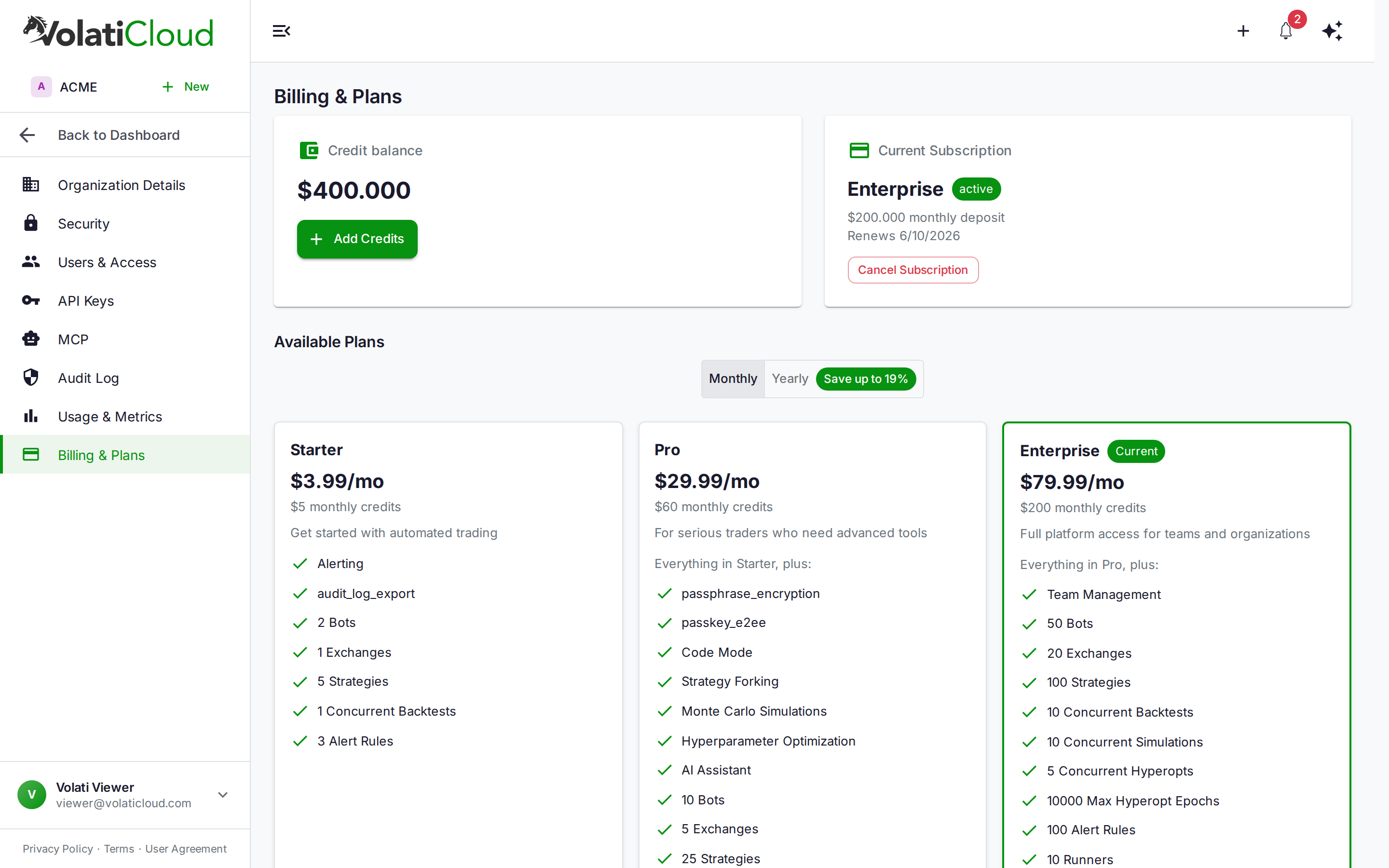
The Two Layers: Subscription and Credits
Most SaaS billing is a flat monthly fee that gates everything. VolatiCloud splits this into two independent concerns:
Subscription — your plan tier. It controls which features you can access (Code Mode for Python strategies, hyperparameter optimization, Monte Carlo simulation, reinforcement learning, the AI chat assistant, team management) and how much of each resource you may create (bots, strategies, bot runners, connected exchange accounts, alert rules). The subscription is renewed monthly (or annually) and doesn't fluctuate based on how much you use the platform.
Credits — your compute fuel. Every time a bot runs, a backtest executes, or a hyperopt job processes epochs, it draws down your credit balance. Credits are denominated in dollars: 1 credit = $1. Each subscription tier auto-deposits a fixed credit amount at renewal, and you can top up manually at any time.
The analogy from the docs is useful: the subscription is your gym membership; credits are your energy bars. You need both to actually do a workout.
A bot that's configured but stopped consumes zero credits. A bot that's actively running consumes credits hourly based on compute load. This means a weekend away from trading doesn't burn through your balance.
Plan Tiers at a Glance
| Starter | Pro | Enterprise | |
|---|---|---|---|
| Monthly price | $3.99 | $29.99 | $79.99 |
| Yearly price | $41.88/yr ($3.49/mo) | $299.88/yr ($24.99/mo) | $779.88/yr ($64.99/mo) |
| Monthly credit deposit | $5 | $60 | $200 |
| Max bots | 2 | 10 | 50 |
| Max strategies | 5 | 25 | 100 |
| Max bot runners | 0 | 1 | 10 |
| Live trading | Yes | Yes | Yes |
| Code Mode (Python) | No | Yes | Yes |
| Hyperopt + Simulations | No | Yes | Yes |
| Team management | No | No | Yes |
Those bot, strategy and runner numbers are hard caps — no tier is uncapped. For the complete feature breakdown, see Plans & Pricing.
Starter: Learning and Paper Trading
At $3.99/month, Starter is designed for traders who want to explore the platform and validate strategies on a small footprint. You get the Visual UI Builder, backtesting, alerting, marketplace strategy forking, and all supported exchanges. Live trading is included — it is not a paid-tier feature — but the caps are tight: 2 bots, 5 strategies, 1 connected exchange account, 1 backtest at a time, and 3 alert rules.
The $5 monthly credit deposit is enough to keep a couple of bots running continuously or run a moderate number of backtests. If you're primarily using VolatiCloud to learn algorithmic trading or prototype a handful of strategies, Starter covers the fundamentals.
What you give up at Starter is significant for active traders: no Python Code Mode for custom indicator logic, no hyperparameter optimization, no Monte Carlo simulation, no reinforcement learning, and no AI chat assistant. If you've already read the hyperparameter optimization guide or the Monte Carlo simulation walkthrough and those capabilities are part of your workflow, Starter will feel constrained quickly.
Pro: The Active Trader Tier
Pro at $29.99/month is where VolatiCloud's full analytical toolkit opens up. The jump from Starter is substantial:
- Code Mode — write strategy logic directly in Python for indicators or conditions the UI Builder doesn't cover
- Hyperparameter optimization — run Freqtrade's hyperopt engine to find optimal parameter combinations across historical data, up to 1,000 epochs per run and 2 runs at once
- Monte Carlo simulation — stress-test a strategy across thousands of randomized trade sequences before risking real capital, 3 at once
- Reinforcement learning and the AI chat assistant
- Passphrase encryption and passkey-backed end-to-end encryption for your exchange credentials
- Higher caps — 10 bots, 25 strategies, 5 connected exchange accounts, 3 concurrent backtests, 20 alert rules, and 1 bot runner
The $60 monthly credit deposit comfortably supports several live bots running concurrently plus a regular cadence of backtests and hyperopt runs. Most VolatiCloud users who are running active strategies are on Pro.
New users can try Pro free for 7 days with $60 of trial credits — full Pro feature access, no charge until conversion. A payment method is collected at checkout, and nothing is charged for those seven days. On day 7 the trial converts to paid and the card is charged, unless you cancel first. Cancel any time during the trial at zero cost.
The trial is the practical way to evaluate whether Pro's optimization tools will improve your strategy's performance enough to justify the upgrade. Run a few hyperopt sessions, do a Monte Carlo analysis on your best backtest, and evaluate whether the compute budget works for your trading style before committing.
Enterprise: Teams and High-Volume Operations
Enterprise at $79.99/month is aimed at trading teams or operations running a large number of concurrent strategies. The key additions over Pro are team management — invites, roles and shared resource visibility, with no cap on the number of seats — much higher resource caps (50 bots, 100 strategies, 20 connected exchange accounts, 10 bot runners, 10 concurrent backtests, 100 alert rules, 10,000 hyperopt epochs per run), and the $200 monthly credit deposit for sustained compute workloads.
If you're running a solo operation — even a sophisticated one with multiple strategies and live bots — Pro is almost certainly the right tier. Enterprise makes sense when multiple traders need simultaneous access, when you need to segregate permissions across team members, or when your volume of active bots and concurrent backtests consistently saturates the credit deposit.
How Credits Get Consumed
Credit consumption is hourly and proportional. A bot that's running costs more than one that's idle; a hyperopt job processing a large number of epochs for a long date range costs more than a short exploratory run.
Practical patterns that matter:
Stop bots during confirmed sideways markets. If your strategy is trend-following and you know the market is range-bound, stopped bots don't consume credits. The market regime detection approaches the community uses can inform this decision.
Use narrow date ranges for exploratory backtests. When you're experimenting with a new indicator configuration, run a 3-month backtest first. Only pull 2–3 years of data once the strategy logic is validated. Backtest credit cost scales with the data volume processed.
Run paper trading first, live trading second. Dry-run bots and live bots consume similar credits, but paper trading lets you validate a strategy's real-time behavior before the live bot is active. The paper trading to live transition guide covers when to make that switch.
Hyperopt epochs vs credit budget. A hyperopt run with 500 epochs costs more than one with 100. Start with a small epoch count to confirm the parameter space is well-shaped, then scale up for a final optimization run. The hyperparameter optimization guide covers epoch selection in detail.
The Credits documentation has the full breakdown of how hourly deductions are calculated per operation type.
What Happens at Zero Balance
Running out of credits doesn't delete your data. When your credit balance hits zero while your subscription is active:
- Running bots are stopped
- Backtests and hyperopt jobs are halted
- Your feature access (Code Mode, hyperopt, etc.) remains intact
- All strategies, backtest results, trade history, and configurations are preserved
You can top up credits at any time from Organization → Billing and bots restart where they left off. VolatiCloud fires a low-balance alert automatically when your balance drops below $5.00 so you have time to top up before hitting zero. This is one of the few alerts the platform triggers for you without any configuration — you won't be caught off-guard by a silent suspension.
If your subscription lapses (cancellation or failed payment), the situation is more complete: bots stop, subscription-provided credits are reclaimed, and feature access is revoked. Manual top-up credits you've deposited yourself are preserved. Resubscribing at any time restores full access using your existing Stripe customer record.
Upgrading vs Downgrading
Upgrades take effect immediately with prorated billing. If you're mid-month and realize you need Code Mode, hyperopt, or simply more than 2 bots, upgrading to Pro applies the new features, the higher caps and the credit deposit right away. You're only charged the difference for the remaining period.
Downgrades are deferred to the end of your current billing period. If you switch from Pro to Starter, you keep full Pro access until renewal. This means you won't lose paid features mid-month, but you should reduce active bots and strategies to fit within Starter's limits before the period ends. You can also cancel a scheduled downgrade before it takes effect by clicking your current plan in the Available Plans grid.
For the exact ledger entries these transitions generate, see Plans & Pricing — Changing Plans.
Yearly Billing: ~20% Off
Switching from monthly to yearly billing saves between 13% and 19% depending on the plan — $6/year on Starter, $60/year on Pro, $180/year on Enterprise. The same monthly credit deposit applies; you're just billed in one annual payment rather than twelve monthly ones. Toggle between billing cycles on the Available Plans grid. The yearly savings is shown next to the toggle ("Save up to 19%") so the math is visible before you commit.
Picking Your Starting Point
| Situation | Recommended |
|---|---|
| Learning algorithmic trading, no real money yet | Starter |
| Have a validated strategy, ready to trade live | Pro (or start with the free trial) |
| Running active strategies, want to optimize with hyperopt | Pro |
| Team of traders, need shared access and role controls | Enterprise |
The 7-day Pro trial removes most of the friction from this decision. You get full feature access and $60 of compute budget — enough to run meaningful hyperopt sessions and evaluate whether the platform fits your workflow before any payment is made.
To start: navigate to Organization → Billing and click Start Free Trial on the Pro card. Stripe Checkout collects a card, and nothing is charged for the seven days. The $60 trial credit deposits immediately and you have 7 days of full Pro access.
Ready to start? Sign in at console.volaticloud.com and navigate to Organization → Billing to compare plans and start the free trial. For detailed feature comparisons and credit mechanics, see the Billing Overview, Plans & Pricing, and Credits documentation.