One Bot, 14 Crypto Exchanges: Multi-Exchange Trading

Not every strategy works on every exchange. A perpetual-futures momentum strategy needs a venue with deep futures liquidity — Bybit, OKX, or Binance Futures, not a spot-only venue. A US-based trader with KYC obligations is fenced into Kraken or Binance US, regardless of how good the spreads on Bybit are. An altcoin scalper running 50 small-cap pairs needs KuCoin's breadth, not Kraken's curated short list. VolatiCloud covers 14 major exchanges so each strategy can run on the venue where it actually fits — and you can run strategies across multiple venues simultaneously from one dashboard.
This post originally listed Coinbase Advanced and Bitfinex among the supported venues and omitted Hyperliquid and MyOKX (EEA). The catalog has never held Coinbase or Bitfinex; the table below is now the real 14, with capabilities read straight from the catalog.
The post also implied that all 14 take a live API key. They do not, and the reason is a guarantee rather than a gap: VolatiCloud stores an API key only when it can prove the key cannot withdraw, by querying the exchange's own permission API. Venues where that proof exists take live keys — Binance, Bybit, Kraken, KuCoin, OKX and MyOKX (EEA). Every one of the 14 still works for market data, backtesting, hyperopt and dry-run bots, none of which need a stored credential at all. The live list grows as each venue's prober ships; see supported exchanges.
Rule 3 of this post's API-key checklist told you to restrict the key to "VolatiCloud's runner IPs". That advice was wrong and has been corrected below. VolatiCloud has no static egress IPs to allowlist — bots run on autoscaling nodes and take the outbound address of whichever node they land on, so a key locked to the addresses you can observe today will start failing authentication without warning. The other four rules are unchanged. See IP Allowlisting.
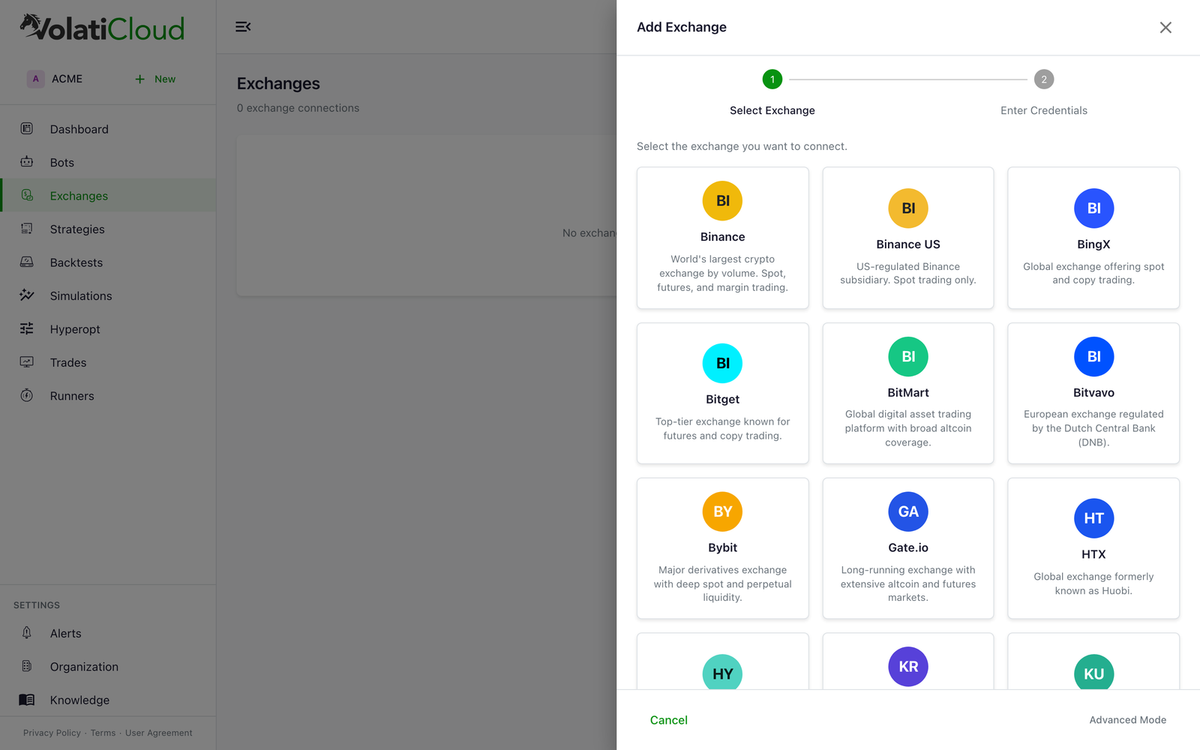
Supported Crypto Exchanges and Their Capabilities
Every venue below is available for market data, backtesting and dry-run bots. Live keys says whether it also takes credentials for live trading.
| Exchange | Live keys | Spot | Margin | Futures | Notes |
|---|---|---|---|---|---|
| Binance | accepted | yes | yes | yes | Deepest liquidity, best historical data coverage |
| Bybit | accepted | yes | no | yes | Excellent perpetual futures liquidity |
| OKX | accepted | yes | no | yes | Strong altcoin selection, USDT-margined perps |
| MyOKX (EEA) | accepted | yes | no | yes | The OKX endpoint EEA residents must use (my.okx.com) |
| Kraken | accepted | yes | no | yes | EU-regulated, strong fiat on-ramps |
| KuCoin | accepted | yes | no | no | Widest altcoin coverage of any major venue |
| Bitget | accepted | yes | no | yes | Copy-trading roots, growing perps depth; needs a passphrase |
| BingX | accepted | yes | no | no | Global access including LATAM/SEA |
| HTX | accepted | yes | no | no | Formerly Huobi; long-running Asia-focused venue |
| Binance US | research | yes | no | no | US-regulated subset of Binance |
| Gate.io | research | yes | no | yes | Long-tail altcoin breadth |
| Hyperliquid | research | yes | no | yes | On-chain perpetuals DEX, negative maker fees |
| BitMart | research | yes | no | no | Wide altcoin selection |
| Bitvavo | research | yes | no | no | EU/Netherlands-focused, EUR pairs |
Margin is Binance-only across the catalog — the other venues expose spot, perpetual futures, or both.
The full setup details (API key permissions, passphrase requirements, exchange-specific quirks) live in supported exchanges.
Spot, Margin, and Futures Trading Modes
VolatiCloud supports the three major trading modes Freqtrade exposes — your strategy declares which it needs, and only exchanges supporting that mode appear in the bot creation flow.
Spot Trading
Buy and sell the underlying asset. Classic trading where you own what you buy.
- No leverage, no liquidation risk
- Loss bounded by position size
- Available on every supported exchange
- Best fit for beginners and conservative strategies
Margin Trading
Trade with borrowed funds for amplified exposure.
- 2×–10× leverage depending on exchange
- Higher potential returns and higher potential losses (liquidations are real)
- Requires sufficient collateral and a margin-enabled account
- Binance is the only venue in the catalog with margin support — everywhere else, leverage means futures
Futures Trading
Trade perpetual or quarterly futures contracts.
- Leverage up to 100× on some venues (use sparingly)
- Long and short with equal ease — essential for long/short mirror mode strategies
- Live on Binance, Bybit, OKX, MyOKX, Kraken and Bitget; also available for backtesting and dry runs on Gate.io and Hyperliquid
Long and Short Strategies in One Bot
VolatiCloud's strategy builder supports bi-directional trading — go long when conditions are bullish, short when bearish, all in one strategy:
# In Code Mode
can_short = True

def populate_entry_trend(self, dataframe, metadata):
    # Long when RSI is oversold
    dataframe.loc[dataframe['rsi'] < 30, 'enter_long'] = 1
    # Short when RSI is overbought
    dataframe.loc[dataframe['rsi'] > 70, 'enter_short'] = 1
    return dataframe
In the Visual Strategy Builder, you can enable Mirror Mode — your long entry conditions are automatically inverted for shorts, including crossover/crossunder pairs and comparison-operator flips. The full pattern is in the long/short mirror mode post.
Exchange API Key Security: AES-256-GCM Field-Level Encryption
Exchange API keys are the most sensitive credentials in your VolatiCloud account. The protections are layered:
- AES-256-GCM field-level encryption. Keys are encrypted at the application layer before they hit the database. Even with a full DB dump, an attacker cannot read your credentials in plaintext.
- Separate encryption key. The encryption key is held outside the database, in a separate secret store. Database admins cannot decrypt the encrypted columns.
- Lazy decryption. Keys are only decrypted in-memory at the moment a bot's runtime config is constructed. They are never logged, never serialized to disk, never returned in API responses.
view-secretsscope. Reading a credential requires an explicitview-secretspermission on the resource — separate from the basicviewscope. A team member can review a bot using a shared exchange without seeing the API key behind it.- No withdrawal permissions. We never ask for, accept, or store exchange withdrawal permissions.
For exchange-side hardening (sub-accounts, minimum scopes, rotation cadence), the exchange API key security post walks through the full setup.
Choosing the Right Exchange for Your Crypto Strategy
Strategy archetype suggests venue:
- High-frequency / low-latency → Binance (deepest liquidity, lowest latency, best fee tiers at volume)
- Perpetual futures / leverage → Bybit or OKX (mature perps, strong funding-rate discovery)
- Altcoin breadth → KuCoin or Gate.io (widest small-cap selection)
- US regulatory compliance → Kraken for live trading; Binance US for research and paper trading
- EU-domiciled traders → Kraken or Bitvavo (EUR pairs, regulated entities)
- Best historical data quality → Binance (most complete coverage for backtesting)
Picking the wrong venue can cost basis points per trade — and basis points compound. The data-availability picture per exchange (which timeframes, how far back) is in the historical data availability post.
Running Bots on Multiple Exchanges Simultaneously
You can run unrelated bots across different venues from one dashboard:
Bot 1 — BTC/USDT RSI Strategy   → Binance Spot
Bot 2 — ETH/USDT EMA Crossover  → Bybit Futures
Bot 3 — SOL/USDT MACD Strategy  → OKX Perpetuals
Bot 4 — Altcoin DCA Basket       → KuCoin Spot
Each bot is fully independent — different runner, different exchange, different strategy. The multi-bot portfolio orchestration post covers how to design a portfolio of bots across exchanges without correlated drawdowns.
Exchange API Key Setup: Five Rules
- Use a sub-account or dedicated trading account. Don't issue API keys against your main holdings; create a sub-account funded only with what the bots will trade.
- Minimum permissions. Grant only Read and Spot/Futures Trade. Never grant Withdraw.
- Skip the IP whitelist. VolatiCloud has no fixed outbound address, so a key locked to an IP list will break without warning — and self-hosting the runner does not get you around it, because VolatiCloud's control plane calls the exchange to verify the key wherever the bot happens to run (why).
- Rotate every 90 days. Add it to your calendar.
- Audit usage on the exchange side. Most exchanges expose API key activity logs — review them quarterly.
The exchange API key security post details each step per exchange.
Setting Up Your First Exchange in VolatiCloud
- Generate API keys on your exchange (follow the exchange-specific permission guide)
- Open Exchanges → Add Exchange in the console
- Select your exchange and paste your credentials
- Hit Test Connection before saving — confirms the key works without ambiguity
- Create a Dry Run bot first to validate end-to-end before committing real capital
Per-Exchange Quirks Worth Knowing About
The Freqtrade engine smooths over most differences between exchanges, but a few quirks are worth knowing about up front:
- Binance regional restrictions. Binance.com is unavailable in some jurisdictions; use BinanceUS for US residents. The two have different supported pairs and different API key generation flows — they are not interchangeable.
- Kraken rate limits. Kraken has stricter rate limits than most venues. For high-frequency strategies running many pairs, you may hit limits before they bite on Binance or Bybit. Consider fewer pairs or a slower timeframe on Kraken.
- Bybit unified vs classic accounts. Bybit's unified trading account exposes spot, margin, and futures from a single API key. Classic accounts segregate them. Match your account type when generating keys.
- OKX passphrase requirement. OKX API keys require a third credential (passphrase) on top of key and secret. The Add Exchange wizard prompts for it explicitly.
- MyOKX is a separate entry, not a setting. EEA residents trade OKX through
my.okx.com, and VolatiCloud exposes that as its own MyOKX (EEA) card so the bot routes to the right regional endpoint. Same setup as OKX, different login domain. - Hyperliquid has no API-key permission model. It authenticates with an EVM agent wallet rather than a key/secret pair, and an agent wallet can move funds out of the account. Withdrawal capability cannot be excluded, so VolatiCloud does not hold one for live trading — Hyperliquid is a backtesting and dry-run venue here.
The full supported exchanges doc has the per-exchange setup guide for each venue, including which permission scopes to enable.
Switching Exchanges Without Rewriting Your Strategy
A strategy in VolatiCloud is exchange-agnostic by default. The same RSI mean reversion or EMA crossover strategy works on Binance, Bybit, Kraken, or KuCoin without modification — the bot configuration (which strategy + which exchange + which runner) is the layer that binds them together. This means you can:
- Run the same strategy on multiple venues to diversify across counterparty risk
- Move a strategy from one exchange to another after a regulatory or operational change
- A/B test a strategy on a primary exchange and a secondary, watching for exchange-specific differences in fills
To connect your first exchange, open Exchanges → Add Exchange in the VolatiCloud console and follow the wizard. The exchange-specific guide linked in the wizard tells you exactly which permissions to request — Read + Trade only, never Withdraw.
Related guides
- Exchanges Overview — API key setup, permissions, and security best practices.
- Supported Exchanges — Full list with capabilities and per-exchange setup instructions.
- Creating a Bot — Use your exchange connection to launch an automated trading bot.